Aplikasi Desktop adalah suatu aplikasi yang mampu beroperasi secara offline, tetapi kita harus menginstalnya sendiri pada laptop atau komputer.
Aplikasi Web adalah suatu aplikasi berbasis web dapat beroperasi jika ada jaringan/koneksi internet.
Salah satu perbedaan yang mendasar dari web based dan desktop based adalah bahasa pemrogramannya kalau pada desktop based di dukung oleh beberapa macam program seperti Microsoft office, Borland Delphi, dll sedangkan untuk web based menggunakan bahasa pemrograman HTML, PHP, CSS, JavaScript, dll.
Perbedaan Aplikasi Desktop dan Web
Aplikasi Dekstop
Aplikasi Web
Grafis
Tingkat grafis ditentukan oleh kebutuhan grafis aplikasi desktop tersebut. Butuh spec yang tinggi.
Grafis yang digunakan tidak begitu tinggi.
Interaksi penggunaan
Tidak semua aplikasi desktop dapat berjalan di semua Sistem Operasi.
Dapat berjalan disemua Sistem Operasi, yang penting ada web browser dan koneksi internet.
Penggunaan jaringan
Tidak bergantung pada internet (dapat berjalan secara offline)
Untuk menjalankannya dibutuhkan koneksi internet (tapi juga dapat berjalan secara offline)
Akses
Terbatas pada laptop atau PC
Dapat diakses dimana saja (mobile, tablet atau PC) asal terdapat web browsernya
Fungsionalitas perbaikan
Dapat dengan mudah memodifikasi settingannya
Tidak memerlukan lisensi ketika menggunakan Aplikasi Web, sebab lisensi itu telah menjadi tanggung jawab dari web penyedia aplikasi.
Popularitas
Aplikasi desktop banyak digunakan sebelum adanya smartphone, namun sekarang popularitasnya mulai meredup.
SIMPULAN KEKURANGAN DAN KELEBIHAN
Aplikasi Berbasis Desktop
Keunggulan
Dapat berjalan dengan independen, tanpa perlu menggunakan browser.
Tidak perlu koneksi internet, karena semua file yang diperlukan untuk menjalankan aplikasinya sudah terinstall sebelumnya.
Dapat dengan mudah memodifikasi settingannya.
Prosesnya lebih cepat.
Kekurangan
Apabila akan menjalankan aplikasi, harus diinstal terlebih dahulu di komputer.
Bermasalah dengan lisensi. Hal ini membutuhkan lisensi yang banyak pada setiap computer
Aplikasi tidak dapat dibuka di computer lain, jika belum diinstall
Biasanya memerlukan hardware dengan spesifikasi tinggi.
Aplikasi Berbasis Web
Keunggulan :
Kita dapat menjalankan aplikasi berbasis web dimanapun kapanpun tanpa harus melakukan penginstalan.
Terkait dengan isu lisensi (hak cipta), kita tidak memerlukan lisensi ketika menggunakan web-based application, sebab lisensi telah menjadi tanggung jawab dari web penyedia aplikasi.
Dapat dijalankan di system operasi manapun. Tidak perduli apakah kita menggunakan linux, windows, aplikasi berbasis web dapat dijalankan asalkan kita memiliki browser.
Dapat diakses lewat banyak media seperti: computer, handheld dan handphone yang sudah sesuai dengan standard WAP.
Tidak perlu spesifikasi computer yang tingggi untuk menggunakan aplikasi berbasis web ini, sebab di beberapa kasus, sebagian besar proses dilakukan di web server penyedia aplikasi berbasis web ini.
Kekurangan
Dibutuhkan system keamanan yang baik dikarenakan aplikasi dijalankan secara terpusat, sehingga apabila server di pusat down maka system aplikasi tidak bias berjalan.
Form adalah elemen HTML untuk mengirim data ke server. Untuk detail mengenai elemen form dan elemen input pada HTML, dapat mengunjungi halaman form pada html dan elemen input pada html. Anda juga mungkin perlu melihat tabel HTML.
Topik kali ini tidak akan membahas terlalu mendetil mengenai elemen form dan input HTML, dan lebih banyak membahas penerimaan data form pada sisi server dengan PHP. Langsung saja, berikut contoh scriptnya.
Data yang terkirim: <pre><?php print_r($_POST);?></pre>
</body>
</html>
Untuk mempelajari kode di atas, paling baik bila Anda mencoba menjalankannya. Copy paste kode di atas ke sebuah file .php, misalnya form.php. Kemudian jalankan dan coba input data ke dalam form yang muncul.
Perlu dijelaskan juga di sini bahwa:
hobi[] dan lomba[] merupakan array karena diakhiri dengan tanda []. Array adalah tipe data PHP yang dapat menampung banyak data sekaligus.
print_r() adalah fungsi yang menjabarkan isi suatu variabel. Biasanya variabel array atau objek.
$_POST, bersama-sama dengan $_GET, $_REQUEST, $_SERVER, $_COOKIE, $_FILES, $_SESSION, $_ENV adalah variabel-variabel yang disebut superglobals. Yaitu adalah variabel yang selalu tersedia dan dapat diakses tidak peduli lingkup variabel seperti apapun.
Method POST pada form PHP
Kode di atas pengiriman datanya menggunakan metode POST. Metode ini sering dipakai pada form pendaftaran online, login, pembayaran online, form buku tamu dan sebagainya. Sifat dari metode ini adalah:
Datanya tidak terlihat kasat mata.
Bila halaman yang menerima kiriman data direfresh atau dikunjungi kembali dengan tombol back. Akan muncul peringatan "form resubmission". Yaitu pengiriman ulang data.
Bisa menampung data lebih banyak dibanding metode GET
Bisa digunakan juga untuk mengirim file (dibahas di topik lain).
Pada PHP diambil dengan $_POST
Sifat nomor 2 di atas dapat dicegah dengan metode penggunaan ajax. Penggunaan ajax akan dibahas pada topik terpisah.
Metoda POST sudah lebih baik dari segi keamanan dibanding metoda GET. Akan tetapi keamanan metoda POST dapat lebih ditingkatkan lagi dengan https atau ssh.
Method GET pada form PHP
Selain metode POST, terdapat metode GET. Metode ini biasanya dipakai pada form pencarian atau sebagai navigasi halaman web. Sifat dari metode ini adalah:
Data yang dikirim terpampang pada URL, dan dapat diedit lewat URL
Bila halaman yang menerima kirim data direfresh, maka data otomatis terkirim kembali tanpa peringatan
Pada beberapa browser, ukuran data GET terbatas oleh jumlah karakter maksimal pada URL (255 bytes)
Tidak dapat mengirim gambar
Pada PHP diambil dengan $_GET
Method GET sebaiknya tidak dianggap sebagai suatu cara untuk mengirim data pada form. Method GET lebih baik digunakan sebagai suatu alamat web. Seperti misalnya alamat https://www.google.co.id/search?q=belajar+C+sharp&start=30 akan membawa kita ke google langsung dengan kata kunci "belajar C sharp", dimulai dari record ke 30 (halaman 4).
Website dahulu kala pernah menggunakan get sebagai pengarah halamannya. Misalkan http://localhost/index.php?a=buku akan masuk ke halaman buku. http://localhost/index.php?a=member akan masuk ke halaman member dan seterusnya. Saat ini cara seperti itu sudah dipercantik (dan diperumit) dengan penggunaan file .htaccess.
Format dari metode GET pada URL adalah:
Dimulai dengan tanda tanya (?)
Tiap field dipisahkan dengan tanda ampersand (&)
Untuk karakter-karakter khusus misalnya spasi, menggunakan pengkodean URL. Spasi akan menjadi %20. Tanda sama dengan (=) akan menjadi %3D.
Data yang terkirim: <pre><?php print_r($_GET);?></pre>
</body>
</html>
Perhatikan bahwa pada kode di atas, elemen form menggunakan atribut method="GET". Dan juga pada fungsi print_r di bagian bawah, variabel yang dikirim ke fungsi print_r adalah variabel $_GET.
Kode di atas juga sedikit memanfaatkan library font-awesome untuk memunculkan ikon kaca pembesar pada tombol cari.
Peringatan: JANGAN menggunakan method GET untuk form pendaftaran, form login atau form dengan informasi sensitif lainnya.
$_REQUEST pada PHP
Selain menggunakan $_POST dan $_GET data post dan get juga dapat diambil dengan $_REQUEST. $_REQUEST berisi gabungan data $_GET dan $_POST.
Meski terlihat efisien dan memudahkan, disarankan untuk TIDAK menggunakan $_REQUEST karena merupakan suatu celah keamanan. Bila script menggunakan $_REQUEST di dalamnya, maka pengguna aplikasi web dapat menyisipkan data POST melalui URL kapan saja dia mau.
Demikian sekilas mengenai pengiriman data form pada PHP beserta sekilas keamanannya. Semoga bermanfaat.
Tahukah kamu bahwa JavaScript adalah bahasa pemrograman yang digunakan dalam pengembangan website agar lebih dinamis dan interaktif. Kalau sebelumnya kamu hanya mengenal HTML dan CSS, nah sekarang kamu jadi tahu bahwa JavaScript dapat meningkatkan fungsionalitas pada halaman web. Bahkan dengan JavaScript ini kamu bisa membuat aplikasi, tools, atau bahkan game pada web.
Bicara teknis, JavaScript atau kita singkat menjadi JS merupakan bahasa pemrograman jenis interpreter, sehingga kamu tidak memerlukan compiler untuk menjalankannya. JavaScript memiliki fitur-fitur seperti berorientasi objek, client-side, high-level programming, dan loosely typed.
Sejarah JavaScript
Bagi kamu yang masih awam, mungkin penasaran bagaimana awal mulanya diciptakan bahasa pemrograman ini.
Pada tahun 1994 JavaScript mulai dikenal, pada saat itu web dan internet sudah mulai berkembang. JavaScript didesain oleh Brendan Eich yang merupakan karyawan Netscape. Transformasi nama JavaScript, dimulai dari Mocha, Mona, LiveScript, hingga akhirnya resmi bernama JavaScript.
Versi awal bahasa JS hanya dipakai di kalangan Netscape beserta dengan fungsionalitas pun yang masih terbatas. Singkat cerita pada tahun 1996 JavaScript secara resmi dinamakan sebagai ECMAScript. ECMAScript 2 dikembangkan pada tahun 1998 yang dilanjutkan dengan ECMAScript 3 setahun kemudian. ECMAScript terus dikembangkan sampai akhirnya menjadi JavaScript atau JS hingga saat ini. Pada tahun 2016, 92% web diketahui telah menggunakan JavaScript. Itulah mengapa JavaScript atau JS terus berkembang.
Mengapa harus pakai JavaScript?
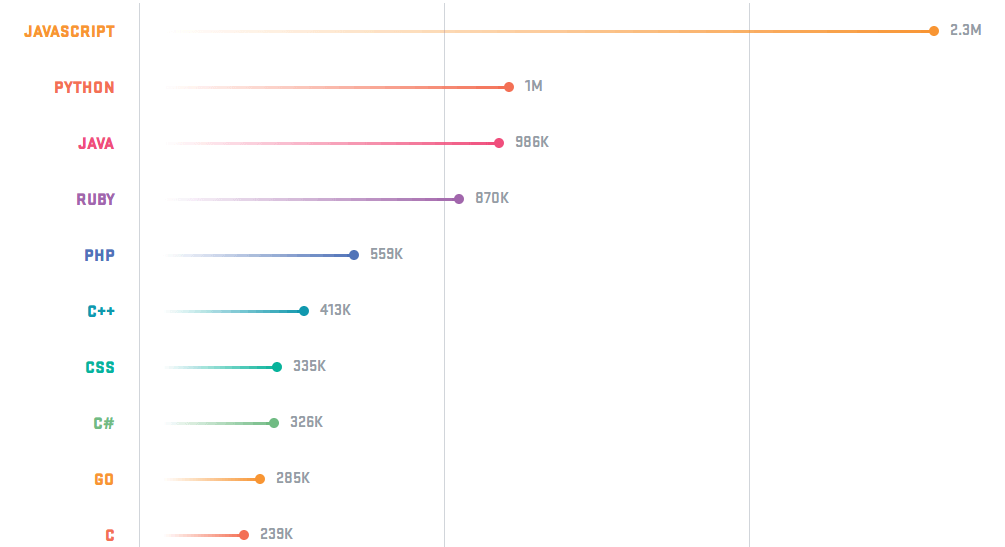
Sebagai developer zaman now. JavaScript menjadi salah satu bahasa pemrograman yang sangat populer. Mengapa? Di tahun 2016 saja sudah ada sekitar 92% pembuatan web menggunakan JS, apalagi di tahun-tahun sekarang. Tentunya web yang dibuat dengan JS akan lebih dinamis dan interaktif. Banyak perusahaan top global yang sudah mengimplementasikan JS sebagai bahasa pemrograman andalannya. Kita bisa buktikan juga bahwa JS itu populer dan menjadi bahasa yang paling banyak digunakan di Github.
Seperti FB, Linkedin, Trello, Medium, bahkan Google, salah satu bahasa yang digunakan di antaranya adalah JS (JavaScript). Itulah alasan mengapa para developer berlomba-lomba untuk jadi yang terbaik dalam mempelajari JavaScript.
Fungsi JavaScript
Kamu pasti sudah paham tentunya dengan fungsi JavaScript. Selain membuat web jadi lebih dinamis dan interaktif, JS digunakan juga untuk proses logika data. ΓÇ£Intinya, fungsi JS tidak hanya soal urusan front end, tapi juga sekaligus dipakai untuk urusan back end,ΓÇ¥ imbuh developer.
Keunggulan JavaScript
Sepertinya kamu sudah mengetahui keunggulan dari JavaScript, tapi saya akan paparkan lebih dalam lagi deh hehe. Inilah beberapa keunggulan JS yang membuat tekadmu kuat untuk mempelajarinya.
1. General Purpose
Saat ini JavaScript tidak hanya digunakan di sisi client (browser) saja lho. Semenjak adanya Node.js JavaScript dapat digunakan di luar dari browser. Dengan begitu kamu bisa mengembangkan back-end (server), console, program desktop, mobile, IoT, game, dan lainnya menggunakan JavaScript.
2. Mudah untuk Dipelajari
Setiap bahasa pemrograman memiliki tingkat kesulitan yang berbeda. Tingkat kesulitan bisa dilihat dari beberapa faktor. Menurut saya sih, syntax atau penulisan jadi salah satu faktor yang paling penting buat dipelajari. JS masih tergolong mudah dipelajari asalkan kamu serius dalam belajar dan selalu berani melakukan improvement atau bermain-main dengan itu. Masih belum percaya JS mudah dipelajari? Baiklah, ini perbandingan JS dengan beberapa bahasa lainnya. Contohnya dalam menampilkan ΓÇ£Hello World!ΓÇ¥ ya.
3. Sangat Powerfull
Kamu harus tau! JavaScript termasuk bahasa pemrograman yang sudah mature, sifat inilah yang membuat JavaScript sangat powerfull. Dulu, website basisnya masih PHP atau mungkin saja kita pakai WordPress. Semua logika web dibuat dan bergantung pada sisi server. Inilah yang membuat web browser lebih statis.
Browser modern memiliki sifat interaktif dan dinamis. Logika yang sebelumnya harus di-handle oleh sisi server, kini sepenuhnya dapat di-handle pada sisi client, semua berkat JavaScript.
4. Banyak perusahaan yang mengimplementasikan JS
Siapa yang nggak mau kerja di startup? Iya pasti maulah, jika gajinya besar hehe. Kamu akan dibutuhkan perusahaan seperti startup jika serius untuk belajar JavaScript.
JavaScript menempati urutan ke-4 soal gaji developer tertinggi di tahun 2018 dengan rata-rata pendapatan adalah $105,415 (Techrepublic). Bayangkan jika dirupiahkan? Apalagi pada tahun ini bisa makin lebih besar nih. Dan lebih manisnya lagi, jika kamu bekerja sebagai developer Google dsb karena mereka semua sudah menerapkan JavaScript sebagai penunjang teknologi. Dan itupun juga tergantung pada level pemrograman kamu dan juga posisi kerja.
5. Dukungan Komunitas
Inilah salah satu alasan JavaScript banyak digandrungi oleh developer. Dukungan dari komunitas adalah hal penting dalam memilih sebuah bahasa pemrograman. Tentu saja, jika kamu sedang mengembangkan sebuah aplikasi, serta menemukan bug. Dengan dukungan komunitas yang baik, maka kamu akan lebih mudah untuk menemukan solusi dari bug tersebut.
Tools yang Dipakai untuk Belajar JavaScript
Apa saja sih tools yang harus disiapkan untuk belajar JavaScript? Khusus bagi pemula, kamu cukup menggunakan tools berikut:
Banyak orang yang mengatakan, ΓÇ£Belajar JavaScript itu susah, tidak seperti belajar HTML. Sebab saat melihat hasilnya di web browser, pesan error-nya tidak tampil.ΓÇ¥ Pendapat ini tidak benar ya karena kamu bisa melihatnya melalui console.
Buka terlebih dahulu Google Chrome, kemudian klik kanan pilih ΓÇ£InspectΓÇ¥ -> Console.
AJAX (Asynchronous JavaScript and XML) adalah teknik yang memungkinkan pembaruan sebagian halaman web tanpa me-reload seluruh halaman, sehingga membuat aplikasi web lebih dinamis dan responsif. Ini dicapai dengan menggunakan JavaScript untuk mengirim dan menerima data dari server di latar belakang, yang kemudian digunakan untuk memperbarui hanya bagian yang relevan dari halaman.
jQuery Mobile Tutorial: Creating a Restaurant Picker Web App
With an increase in the number, diversity and complexity of smartphones, more and more companies want to have their own mobile app, but creating a native app can be pretty expensive. It requires special skills, as well as special coding tools, and then there is also the need to build an app per platform (Android, iOs, BlackBerry, Windows Phone, etc).
All of this figures in to a higher price tag for the app development. Another solution for developers is then to create something called web-apps: HTML CSS apps, which users can access from their browsers. They are cross-platform, and cross device.
The jQuery framework has been around the web for a while now, but the jQuery base technology was basically designed for browser apps. jQuery Mobile is a framework based on jQuery that enables web designers to create web-apps that are optimized for use on a mobile device (Smartphone and tablets). The framework is touch optimized, uses responsive layout so that elements will automatically adapt on different device sizes, and supports a range of different platforms and devices.
In this jQuery Mobile tutorial, we will create a nice demo app from scratch, to show some of the things that can be easily done using this powerful tool.
We will create an application that will enable the user to choose a restaurant based on what they want to eat tonight, the town where they want to eat and other userΓÇÖs ratings of the restaurants. The jQuery Mobile mini app weΓÇÖre creating will be called ΓÇ£Restaurant PickerΓÇ¥.
Please note that this is only the front development, you will of course need a server and a database if you want to create a real app. Also note that jQuery Mobile uses Ajax navigation, so youΓÇÖll need to put the files either on a local server (xampp, mamp, etc) or on a real server to make the demo work properly.
Wireframing Our Application.
In order to see where we are going, we will first draw some wireframes to see what each screen of the app will look like.
Home Screen : Choose a Plate
On the first screen we will put the logo of our application. We will then give the user a choice between different plates. Each choice comes with an image illustrating the plate, and each is a link that will lead to the second page where the user can choose the town.
Choose a Town
On the second screen, the user can choose the town where they want to eat. The towns are displayed in a list of clickable items. Beside each town there is a bubble that gives the user the number of restaurants available for the chosen plate in this town.
Since the list of towns can be pretty long, we will provide a filter so that the user can quickly search for a town at the end of the list. The title bar will use the branding of the application, and a ΓÇ£backΓÇ¥ button that user can click to go back to the previous step.
When the user clicks on a town, they are lead to the page where they can choose a restaurant.
Choose a Restaurant
The user can now choose in which restaurant he wants to eat. The application displays a list of restaurant with a little image, the name, and the number of rating stars the previous users gave to this restaurant.
The title bar will use the branding of the application, and a ΓÇ£backΓÇ¥ button that user can click to go back to previous step. The user can then click on a specific restaurant, to see the details.
Restaurant Details
The restaurantΓÇÖs details view is composed of three parts: restaurant details, contact details, and the establishmentΓÇÖs user rating.
The restaurant details will display a short description of the restaurant, some plates, a picture and a link to their website if they have one.
The contact details will display the address of the restaurant, and an image of a Google map that will locate the restaurant in the town. A link enables the user to open Google maps (either using the browser or the Google map app if available depending on the device) to locate the restaurant on the map. Another link will dial the restaurant phone number directly on the mobile device so that user can place a reservation.
The last part of this view is a select box, where the user can rate the restaurant.
Building the web-application base
Now that weΓÇÖve see the direction that we are heading, we can begin digging a little bit into the code.
Some jQuery Mobile Basics
First letΓÇÖs take a look at what the header of our first HTML page will look like :
The first thing to notice is the ΓÇ£newΓÇ¥ HTML5 doctype. jQuery Mobile makes a heavy use of the data- HTML5 attribute to add some elements in the DOM to style the page, so we will need an HTML5 doctype to make it all work nicely.
The second thing to notice is the meta name=viewport tag. We will use this meta tag to gain better control of our viewport. Without this tag, the browser will squeeze our layout in the whole page, and it will look ugly and very tiny. With width=device-width we will use our device width, making the app fit the whole size of the device without being squeezed. The initial-scale property controls the zoom level when the page is first loaded and we will set it to 1, meaning no zoom in or out when page is loaded.
Then we will call our CSS files. In older jQuery Mobile versions the CSS was in one file, but in the newer version they made a distinction between the structure and the actual design (colors, gradients etc) which makes it easier to create custom styles.
We then need to load our jQuery, and jQuery Mobile JavaScript code at the end, since it needs the jQuery library to work.
What YouΓÇÖd Like to Eat: First Page
Now letΓÇÖs take a look at the HTML code of our first page, in this exercise we will call this page index.HTML
<body>
<div data-role="page" id="home" data-theme="c">
<div data-role="content">
<div id="branding">
<h1>Restaurant Picker </h1>
</div>
<div class="choice_list">
<h1> What would you'd like to eat? </h1>
<ul data-role="listview" data-inset="true" >
<li><a href="choose_town.HTML" data-transition="slidedown"> <img src="https://www.noupe.comsushis.jpg"/> <h3> Some Sushis</h3></a></li>
<li><a href="choose_town.HTML" data-transition="slidedown"> <img src="https://www.noupe.compizza.jpg"/> <h3> A Pizza </h3></a></li>
<li><a href="choose_town.HTML" data-transition="slidedown"> <img src="https://www.noupe.comkebap.jpg"/> <h3> A Kebap</h3></a></li>
<li><a href="choose_town.HTML" data-transition="slidedown"> <img src="https://www.noupe.comburger.jpg"/> <h3> A Burger</h3></a></li>
<li><a href="choose_town.HTML" data-transition="slidedown"> <img src="https://www.noupe.comnems.jpg"/> <h3> Some Nems </h3></a></li>
<li><a href="choose_town.HTML" data-transition="slidedown"> <img src="https://www.noupe.comtradi.jpg"/> <h3> Something more traditional</h3></a></li>
</ul>
</div>
</div>
</div><!-- /page -->
</body>
</HTML>
jQuery Mobile makes the distinction between HTML documents and pages. A jQuery Mobile app can be composed of one HTML document with multiple pages in it, using the data-role=ΓÇ£pageΓÇ¥ attribute each page is linked using anchors; or of many documents, each one having its own data-role=ΓÇ¥pageΓÇ¥ linked using ΓÇ£normalΓÇ¥ links. In our case, we will go for creating one HTML document per page.
So first we will open our body, and create our page using <div data-role=ΓÇ¥pageΓÇ¥ id=ΓÇ¥homeΓÇ¥ data-theme=ΓÇ¥cΓÇ¥>
We will then open a content division, in which we put the branding of the app, and our first title followed by the list of different plates.
To create a jQuery Mobile list, we will put the data-role=ΓÇ¥listviewΓÇ¥ attribute on our <ul> element. data-inset=ΓÇ¥trueΓÇ¥ is here to style the list as an inset list (with rounded corners and padding around it).
Each list element <li> that contains an <a href> link will be automatically converted in a link list item by jQuery Mobile. To add the image, we simply add an image inside our < a href> link, and jQuery Mobile will do the work for us: it will display it on the left part of the list. Pretty easy.
The data-transition=ΓÇ¥slidedownΓÇ¥ creates the transition between two pages. You can find more transitions in the official documentation.
Here is what our first page looks like:
In Which Town Do You Want To Eat: Second Page
We will name the second page choose_town.HTML . Here is the HTML code, explanation of the tricky parts follows. Note that the header wonΓÇÖt change.
We changed the id, so that jQuery Mobile can understand that this is another page. Notice that we used the data-add-back-btn=ΓÇ¥trueΓÇ¥ on the page div, this will enable the Ajax back navigation and automatically add a back button to our title bar.
To create our title bar, we will create a div element, with the data-role=ΓÇ¥headerΓÇ¥.
To add a filter to our list, we will simply put data-filter=ΓÇ¥trueΓÇ¥ on the ul element defining the list. Note that this is a filter that will filter the items of the list, and is not a search bar.
The last trick will be creating the little bubbles on the right of list elements, and we will do that by creating a span with the class and the numbers in it. And here is how the second page will look:
Choose a Restaurant: Third Page
We will name this page choose_restaurant.HTML and below is what the HTML code will look like.
This page is pretty similar to the first one, except for the title bar and the notation of the customer. We already saw how to create a title bar in previous section. For the customer rating, we add a p element with two classes: .classement is mutual to all the elements and will enable us to style this element with little stars, and then we use the class .one, .two, .three and .four to make the distinction between how many stars the customers gave to the restaurant. We will later in the article see how to style this in a nice way, but for the moment, weΓÇÖll leave it plain text.
Here is our third page:
Restaurant Details: Fourth Page
This page called restaurant.HTML is the trickiest of all, mainly because it has lots of elements on it. We will split the code in three parts: the restaurant description, the contact details, and the user rating. Here is our full HTML code.
<body>
<div id="restau" data-role="page" data-add-back-btn="true">
<div data-role="header">
<h1> Restaurant Picker</h1>
</div>
<div data-role="content">
<div class="ui-grid-a" id="restau_infos">
<div class="ui-block-a">
<h1> Le Mouffetard</h1>
<p><strong>  Restaurant bar in the center of Strasbourg</strong></p>
<p> On the menu: </p>
<ul>
<li> Milkshake with chocolat</li>
<li> Planchettes </li>
<li> Leek pie </li>
</ul>
</div>
<div class="ui-block-b">
<p><img src="https://www.noupe.comrestau01.jpg" alt="jeannette photo"/></p>
<p><a href="http://www.google.fr" rel="external" data-role="button"> See our website</a></p>
</div>
</div><!-- /grid-a -->
<hr/>
<div class="ui-grid-a" id="contact_infos">
<div class="ui-block-a">
<h2> Contact us</h2>
<p>30 Rue des Tonneliers</p>
<p> 67000 Strasbourg	</p>
</div>
<div class="ui-block-b">
<img src="https://www.noupe.com01_maps.jpg" alt="plan jeanette"/>
</div>
</div><!-- /grid-a -->
<div id="contact_buttons">
<a href="http://maps.google.fr/maps?q=jeannette+et+les+cycleux&hl=fr&sll=46.75984,1.738281&sspn=10.221882,18.764648&hq=jeannette+et+les+cycleux&t=m&z=13&iwloc=A" data-role="button" data-icon="maps"> Find us on Google Maps </a>
<a href="tel:0388161072"  data-role="button" data-icon="tel"> Call us </a>
</div>
<hr/>
<div id="notation">
<form>
<label for="select-choice-0" class="select"><h2> User rating </h2></label>
<select name="note_utilisateur" id="note_utilisateur" data-native-menu="false" data-theme="c" >
<option value="one" class="one"> Not good at all </option>
<option value="two" class="two">Average </option>
<option value="three" class="three">Pretty good </option>
<option value="four" class="four"> Excellent </option>
</select>
</form>
</div>
</div>
</div><!-- /page -->
</body>
For the restaurant details, we used the build in two column elements of jQuery Mobile. To create a two column block, we create a block with two child blocks. To create a nice button for the website, we added the data-role=ΓÇ¥buttonΓÇ¥ to the a href element, and a rel=ΓÇ¥externalΓÇ¥ so that jQuery Mobile knows that Ajax should not used to open this link, but that this is an external link.
For the contact details, we once again used the two column trick. WhatΓÇÖs to emphasize here are the buttons. The data-icon=ΓÇ¥mapsΓÇ¥ and data-icon=ΓÇ¥telΓÇ¥ will enable us to add custom icons to those buttons.
The interesting part about adding a GoogleMap link, is that some mobiles will be able to detect it, and will ask the user if they want to open them using the browser; if the Google maps app is installed on the device. The other interesting part is the href=tel:0388161072 protocol. This wonΓÇÖt work on a classic browser, but Smartphones will be able to open this link in the phone dial box, to directly call the number.
The last part is the user rating. For this we will use a simple select menu. The data-native-menu=ΓÇ¥falseΓÇ¥ enables us to style the select using jQuery Mobile, so that we will be able to add some nice stars here too. Here again you will notice that we added the one, two, three, four class for further styling.
And here we have a fully functional jQuery Mobile webapp. But this app looks very ΓÇ£JqueryMobile-likeΓÇ¥, so we now have to give it a little more styling to make it look nicer.
Based on his workshops, mobile consultant Jonathan Stark compiles the top principles of mobile interface design and explains how to take your mobile app from concept to completed design .
No matter how you measure it, mobile is huge and growing. The convergence of cloud computing, ubiquitous broadband, and affordable mobile devices has begun to transform every aspect of our societies. Analysts predict that by 2015, mobile phones will overtake desktop computers as our primary means for accessing the internet.
In order to keep pace with this rapidly changing landscape, designers and developers ΓÇô and the people who work with them ΓÇô need to start thinking about mobile as a primary project goal; not something tacked onto a desktop-centric project as an afterthought.
Mobile is different
Although they are often lumped together as computing devices, smartphones and desktop computers are very different: small screen vs big screen, intermittent vs reliable connectivity, low vs high bandwidth, battery powered vs plugged in, and so on. Given this list, one might be tempted to think of mobile devices as underpowered versions of 'real' computers. But this would be a mistake.
In fact, the reverse is true: smartphones are actually more powerful than desktops in many ways. They are highly personal, always on, always with us, usually connected and directly addressable. Plus, they are crawling with powerful sensors that can detect location, movement, acceleration, orientation, proximity, environmental conditions and more.
Given the many differences between mobile and desktop computing devices, it should come as no shock that designing for mobile is very different than designing for the desktop. From my workshops, IΓÇÖve compiled a list of 10 principles of mobile interface design that help people familiar with desktop design and development unleash the unique power of the mobile platform.
01. Mobile mindset
Because of the differences between mobile and desktop, itΓÇÖs imperative to get yourself into a mobile mindset before getting started.
Be focused: More is not better. Edit your features ruthlessly. You are going to have to leave stuff out.
The Wenger Giant proves that more is not necessarily better
Be unique: Know what makes your app different and amplify it. There are lots of fish in the sea of mobile apps. If thereΓÇÖs nothing special about your app, why would anyone pick it?
Be charming: Mobile devices are intensely personal. They are our constant companions. Apps that are friendly, reliable and fun are a delight to use, and people will become quite attached to the experience.
Be considerate: App developers too often focus on what would be fun to develop, their own mental model of the app or their personal business goals. These are good places to start, but you have to put yourself in your users' shoes if you ever hope to create an engaging experience.
02. Mobile contexts
The image of the busy professional racing through the airport with a bag in one hand and smartphone in the other is what lots of people picture when they think about mobile computing context. It is certainly one context, but itΓÇÖs not the only one. To begin to put ourselves in the shoes of our users, we need to consider three major mobile contexts: Bored, Busy and Lost.
Bored: There are a lot of people using their smartphones on the couch at home. In this context, immersive and delightful experiences geared toward a longer usage session are a great fit. Still, interruptions are highly likely so be sure your app can pick up where your user left off. Examples: Facebook, Twitter, Angry Birds, web browser.
Busy: This is the 'running though the airport' scenario. The ability to accomplish micro-tasks quickly and reliably with one hand in a hectic environment is critical. Remember that the user will have tunnel vision in this context, so huge targets and bold design are important. Examples: TripIt, email, calendar, banking.
Lost: Users who are in transit, in unfamiliar surroundings, or in familiar surroundings but interested in something unknown around fall into the lost category. In this context, sketchy connectivity and battery life are big concerns, so you should offer some level of offline support and be sparing with your use of geolocation and other battery hogs. Typical examples: Maps, Yelp, Foursquare.
03. Global Guidelines
Different apps call for different approaches, designs and techniques. That said, the inherent nature of a pocket-sized touchscreen device suggests several global guidelines; ie, the stuff that always matters.
Responsiveness: Responsiveness is absolutely critical. I canΓÇÖt stress this enough. If your user does something, your app needs to acknowledge the interaction instantly. Note that responsiveness and speed are not the same thing. ItΓÇÖs OK if certain operations take time. Just make sure you let the user know youΓÇÖre working on it.
Polish: Polish is extremely valuable. Because of the 'constant companion' nature of our relationship to smartphones, paying a lot of attention to getting the little details perfect will be noticed and appreciated. I think of this as being like the 'fit and finish' of a car. The engine might be powerful and the body style gorgeous, but if thereΓÇÖs a lot of road noise or rattling on the highway, the experience will begin to degrade for the commuter.
Thumbs: With the advent of touchscreen interfaces, everyone is always talking about 'finger this' and 'finger that'. In reality, the thumb is what we need to design for. Unless the user is interacting with her smartphone with two hands, itΓÇÖs almost impossible to get a finger on the screen. And even in a two handed grip, sheΓÇÖs likely to type with two thumbs. Thumbs are the default.
Targets: Look at your right thumb. Not the tip, but the face ΓÇô the part that comes into contact with your phone screen. Mine is the approximate size and shape of a bottle cap. Great for a lot of things, but far from precise when it comes to targeting tiny regions of my smartphone. It seems the magic number for thumb friendly UI elements is 44 pixels. Exceptions abound, but this is a good ΓÇô ahem ΓÇô rule of thumb. You should also be conscious of where you place your targets relative to each other. For example, putting the Backspace button directly adjacent to the Send button in an SMS app would be a bad idea.
Content: The revolution of touch interfaces is that they enable us to interact directly with our content. This removes abstractions (such as mouse and trackpad) and is more in line with how our brains are wired. I donΓÇÖt have to look far to see the significance of this: my two-year-old can operate an iPad without difficulty but a laptop is a mystery to him. Leverage the intuitive power of touch UI by minimising interface chrome (buttons, tab bars, checkboxes, sliders and so on) wherever possible and putting your content front and centre.
Clear for iOS is a to-do list app that has no chrome at all; itΓÇÖs pure content
Controls: When you do have to add controls, try to put them at the bottom of the screen (in other words beneath the content). Think of an adding machine, a bathroom scale or even a computer ΓÇô the controls are beneath the display. If they werenΓÇÖt, we wouldnΓÇÖt be able to see what was going on with the content while we were using them.Contrast this real-world design consideration with traditional web or desktop software, where navigation and menu bars are virtually always at the top. This makes sense in a mouse context because the pointer is nearly invisible. Not so with the 'meat pointer' at the end of your arm.
Scrolling: Avoid scrolling. I can assure you that 'below the fold' exists for mobile. Also, having a non-scrolling screen has a more solid and dependable 'feel' than a scrolling view because itΓÇÖs more predictable. Of course, certain screens have to scroll, but itΓÇÖs good to avoid it where you can. If you think discoverability might be an issue, you can reverse animate scrollable content into its default position to give a subtle but effective indication that there is more content out of view.
04. Navigation Models
There are plenty of novel navigation models for mobile apps (PathΓÇÖs radial corner nav springs to mind) but if you're going to use one of common navigation models, be sure to pick the one that makes the most sense for your app.
None: Single screen utility apps (eg Weather app on iPhone)
Tab bar: Three to six distinct content areas (eg Twitter for iPhone)
Drill down: List and detail content hierarchy (eg Settings app on iPhone)
05. User input
Typing stinks even on the best devices, so you should do what you can to make it easier for your users. For example:
There are about a dozen keyboard variations on popular smartphones (text, number, email, URL and so on). Consider each of your input fields and be sure to display the keyboard that will be most useful for the data entry being done.
Auto-correct can be so hilariously frustrating that there is a website devoted to it. Consider each of your input fields and decide which auto entry options should be enabled (such as auto-correct, auto-capitalisation and auto-complete).
If your app invites a lot of typing, you should ensure you support landscape orientation for fat-thumbed folks like me.
A sample of the various keyboards available on iOS
06. Gestures
One of the most iconic aspects of modern touch interfaces is that they support gesture-based user interaction. As cool as gestures are, there are several things you need to keep in mind:
Invisible: Gestures are invisible, so discovery is an issue. You have to decide how to reveal their existence to the user. The most clever approach IΓÇÖve seen is on the promotional iPads mounted in AppleΓÇÖs retail stores. When a page first loads, any scrollable areas do a quick 'reverse scroll' into their default position. This immediately invites a swipe or flick gesture from the user without having to explicitly indicate which areas are scrollable.
Two hands: Multi-touch gestures require two-handed operation. I find this particularly evident in the native Maps app on iOS which uses a pinch open gesture to zoom out. When IΓÇÖm traveling in a foreign city with a coffee in one hand and my phone in the other, this is an annoying limitation. Android addresses this issue by including zoom in/out buttons overlaid on the map (which means you can continue enjoying your coffee while hoofing it around London).
Nice to have: In most cases, I consider gestures a 'nice to have' but not critical. Sort of like keyboard shortcuts ΓÇô power users will love them, but most people wonΓÇÖt even know they are there.
No replacement: A common vocabulary for gestures doesnΓÇÖt exist yet so itΓÇÖs too soon for most apps to skip visible controls that can be used with a single-finger.
07. Orientation
Portrait is by far the most popular orientation so optimise for this case first.
If your app invites lots of typing, you should support landscape orientation so people can access the larger keyboard.
When orientation changes unexpectedly, it’s, well… disorienting. If you think your app will be used for long periods of time (for example, the Kindle Reader app), consider adding an orientation lock right in the app.
08. Communications
Provide feedback: Provide instant feedback for every interaction. If you donΓÇÖt, the user will wonder if the app has frozen up, or if they missed the target they were trying to hit. The feedback could be tactile (like the Android ΓÇÿthumpΓÇÖ vibration), or visual (highlighting a tapped button, for instance). If the user has requested an action that is going to take a long time, display a spinner or progress bar to let them know that you received their request and are working on it.
Modal alerts: Modal alerts are extremely pushy and intrusive to the userΓÇÖs flow, so you should only use them when something is seriously wrong. Even then, try to mitigate the intensity by keeping language reassuring and friendly. Remember not to use modal alerts for 'FYI' type information.
Confirmations: When you have to ask a user to confirm an action, itΓÇÖs acceptable to display a modal confirmation dialog (such as 'Are you sure you want to delete this draft?'). Confirmations are less intrusive than alerts because they are in response to a user action and therefore in context and perhaps even expected. Be sure to make the 'safest' choice the default button in the dialog to help avoid inadvertent destructive actions.
The Twitter app for iOS has a completely content-free launch page
09. Launching
When a user goes back into your app after having used it previously, you should resume operations right where the user left off. This will give the illusion of speed and contribute to an overall feel of responsiveness.
If possible, the launch screen you display when the app is first loading should be a 'content-less' image of your app. Anything that looks interactive (such as buttons, links, icons, content) will create frustration by inviting failed interactions.
NOTE: Resist the temptation to place branding materials on your launch screen. They make the user feel as if theyΓÇÖre viewing an ad and theyΓÇÖll resent you for making them sit though it. Of course, a branded launch screen doesnΓÇÖt last any longer than an empty one, but the perception of delay exists regardless.
10. First impressions
Your icon: Your icon has to compete for attention in a sea of other icons. That being the case, think of it more as the business card than an art piece. Be literal ΓÇô show what your app does. Use a strong silhouette and keep text to a minimum. A polished icon suggests a polished app, so itΓÇÖs worth devoting serious time and money to doing it right.
First launch: First launch is a make or break situation. If a new user gets confused or frustrated while trying to acquaint themselves with your app, theyΓÇÖll ditch it ASAP. If your app provides complex functionality, you might want to include a 'tips and tricks' overlay, or perhaps a few panels of orientation screens. Note that this is not a substitute for a good design; if you find yourself creating a lot of help text, it could indicate that your UI needs work.
Conclusion
Mobile computing represents a staggering opportunity for web designers and developers who want to become productive on mobile. Yes, there is a bit of a learning curve, but much of a web professional’s legacy experience, skills, and tools will translate nicely. Admittedly, the rate of change in the mobile world can be a bit daunting at times – but hey… at least it’s never boring.
"Asynchronous JavaScript and XML") is a set of web development techniques that uses various web technologies on the client-side to create asynchronous web applications. With Ajax, web applications can send and retrieve data from a server asynchronously (in the background) without interfering with the display and behaviour of the existing page
SQL is a standard language for storing, manipulating and retrieving data in databases.
Native Apps, Web Apps or Hybrid Apps? WhatΓÇÖs the Difference?
What are Native apps, Web and Hybrid apps?
More importantly, which is the most appropriate app type for you and your business?
If youΓÇÖre looking for answers to these questions, then this post is for you. WeΓÇÖve spent the last 8 years helping businesses to turn their websites and web apps into native apps. Our News and Commerce platforms produce native apps while Canvas produces Hybrid apps.
Which type of app should you build? Unfortunately there is no single, definitive answer.
The debate between Native Apps vs Hybrid Apps vs Web Apps is still ongoing, with no clear winner ΓÇô all three choices have their benefits.
Your choice will depend on several competing factors, including your budget and your deadline. We want to give you a sound understanding of the different types of apps available and to help you to make a smart, informed decision on which technology you should use to build your app.
HereΓÇÖs a video overview containing the key takeaways from this article:
Want to build mobile apps without the usual investment and months of development? The fastest and most affordable way to build a mobile app is to convert your existing site into native mobile apps. At MobiLoud we built three solutions exactly for this ΓÇô News, Commerce and Canvas. With Canvas, you can convert any type of site into native mobile apps. All your site features work out of the box. Get a free a demo to learn how it works and if itΓÇÖs a good fit for your site.
The Basics
When talking about ΓÇÿapp developmentΓÇÖ, we are usually talking about developing for mobile devices ΓÇô including smartphones, phablets, and tablets.
There are also apps for the web and wearables like smartwatches, but for the purposes of this article, weΓÇÖll stay within the bounds of mobile devices like smartphones and tablets.
More specifically, weΓÇÖll be focusing on mobile apps for the two largest and most important mobile operating systems: iOS and Android.
iOS vs. Android
Globally, most peopleΓÇÖs mobile devices run on iOS and Android.
As of 2018, Android controls about 88% of the mobile device market worldwide, and Apple owns most of the rest. The number of Android users has grown from 1.8 billion devices in September 2015 to over 2.5 billion today. With more and more of the worldΓÇÖs population coming online over the next decade, Android will keep growing.
But that doesnΓÇÖt necessarily mean you should develop for Android first. WeΓÇÖll cover this later in the article.
Global market share held by the leading smartphone operating systems in sales to end users from 1st quarter 2009 to 2nd quarter 2018 (Source: Statista)
iOS is developed and supported by Apple and is used only on their own devices, iPhones and iPads.
In other words, in the Apple universe, they control both the hardware and the software. Because of this, they can more closely control how their devices (and mobile apps on their devices downloaded from the iOS App Store) function, which enables them to maintain a loyal user base and a solid amount of market share.
Android is developed and supported by Google, often considered a more open platform compared to Apple.
In fact, Android is an open source operating system, which means that a number of device makers can use Android on their devices. Google sells a few devices of its own, but many Android users are using devices built by other companies like Samsung, Huawei, LG, HTC, etc.
Can iOS and Android apps work together?
Unfortunately not.
There isnΓÇÖt any overlap between the apps created for iOS and Android. This means that native iOS apps wonΓÇÖt run on Android phones, and vice versa.
Even though you see Snapchat or Instagram, for example, running on both phones and looking very similar, they were actually built entirely separately.
Now that weΓÇÖve got the basics, letΓÇÖs define native, web, and hybrid mobile apps.
Web Apps
According to Wikipedia, a web app ΓÇ£is an application that is accessed via a web browser over a network such as the Internet.ΓÇ¥
DonΓÇÖt let the word ΓÇ£appΓÇ¥ confuse you, though. Web apps donΓÇÖt need to be downloaded like mobile apps do.
Web apps load in browsers like Chrome, Safari, or Firefox and they donΓÇÖt take up any memory or storage on the userΓÇÖs device.
How are Web Apps built?
The vast majority of Web App development is done using JavaScript, CSS, and HTML5.
Unlike an iOS or Android app, there is no software development kit (SDK) for a developer to work with.
There are templates and frameworks for developing web apps like Angular, React, and Vue.js that you can use to get a quick start.
Developing Web Apps vs. Mobile Apps
As opposed to mobile apps, developing a web app can be simple and quick ΓÇô although it can also be complicated, depending on your requirements.
ItΓÇÖs often a good way to test out an idea before investing in a native mobile app.
However, if your web app is relatively simple and designed for desktop users over mobile, you may miss out on mobile traffic, engagement, and revenue opportunities.
Until recently, web apps lacked the functionality of native apps, like the ability to send push notifications, work offline, and load on the home screen. The internet was mostly composed of static web pages.
However, there have been a improvements to browsers and web technologies ΓÇô and web apps can now harness all these features.
Apps that take advantage of these features are called Progressive Web Apps (PWAs).
They go beyond the scope of this article, but you can find a comprehensive guide by Google here. You should also check out our detailed guide to progressive web apps that includes a detailed overview and 50 PWA examples.
Are Progressive Web Apps the way to go?
It depends what your goal is. In general, they are good for giving your existing audience a better experience on mobile than they currently get with your site. We recommend creating a PWA, but it is not really a substitute for mobile apps ΓÇô it is more of an upgrade of your current web UX. Why?
If your goal is to cover an audience on Android and iOS, then progressive web apps are probably not optimal.
They can be a great solution on Android, but on iOS support is still rather limited, meaning youΓÇÖll likely be missing functionality you need in the long run, especially push notifications.
Consumers are also increasingly using Google Play and the App Store to search for solutions to their problems, as opposed to purely using the mobile web ΓÇô so even though PWAs help provide a better mobile UX they donΓÇÖt cover all the bases for mobile discovery.
Installation is also a downside. Although it is technically possible to ΓÇ£installΓÇ¥ a PWA on a mobile device, the process isnΓÇÖt especially straightforward and can confuse users ΓÇô making it harder to get that valued real estate on their home screens.
PWAs can be a good way to quickly get a mobile-app-like web app into peopleΓÇÖs hands. For the above reasons and more though, Progressive Web Apps are not a substitute for mobile apps ΓÇô although they work very well together in tandem.
If you have a WordPress site and want to convert it into a PWA fast, just get in touch with our team. If you already have a PWA, even better, read this detailed piece on how to convert it into iOS and Android apps in just days!
There are two kinds of mobile apps: native and hybrid.
WeΓÇÖll go into what constitutes a native and hybrid app in more detail below. But first letΓÇÖs quickly cover why having a mobile app, whether it be native or hybrid, is a good idea.
Why should I build a Mobile App versus a Web App?
Mobile apps have numerous benefits that web apps lack ΓÇô they especially make sense if your product or service is something that will be used frequently or habitually.
Thanks to a combination of marketing and ease-of-use, a majority of users on mobile access the virtual world through dedicated apps. Mobile apps offer a more streamlined, ΓÇÿcontainedΓÇÖ experience, that can retain users more successfully than a web app.
A web app is good for desktop users, first contact, and picking up referral or organic traffic ΓÇô but it isnΓÇÖt an optimal mobile experience for repeat usage. It IsnΓÇÖt ideal for engaging users and building loyalty and habit around your brand.
Mobile apps on the other hand let you meet the expectations of modern consumers and offer them a better mobile UX through a less distracting, more enclosed environment and a direct route through a single tap on their home screens.
This is far more direct than opening up a mobile browser, typing in an URL, and waiting for everything to load.
Just having a presence on the App Stores can be a benefit for certain businesses too. A lot of consumers these days use Google Play and the App Store to search for solutions to their problems, much like they use web based search engines. If you optimise well for App Store SEO, then you can pick up new users that are searching for related keywords.
Push Notifications
Getting users to your product the first time is easy. Getting them to return can be a challenge. Push notifications will be extremely important for any serious mobile app.
Only mobile apps give you the opportunity to send well-timed push notifications to re-engage users, promote products and offers, and communicate directly with your userbase.
According to data from Localytics, when a user opts in to receive push notifications, they will launch your app 88% more than a user who doesnΓÇÖt receive them.
Another key to growing your app is getting people to share the app itself or content within it to their friends.
This can be done on a web app, but itΓÇÖs best done on a mobile app.
As an app user, you can quickly share to any app on your device (such as Email, WhatsApp, Messenger, Facebook, Instagram etc.) in a much easier way compared to a browser.
Time within apps
Users spend a lot more time on apps than they do on the web.
Time spent in apps is still growing year over year (Source: AppAnnie)
The popularity of apps has increased enormously and is continuing to rise.
Additional Advertising Revenue
One more advantage to building a mobile app over a web app is ad revenue, and the opportunity to use other app monetization techniques. CPM for ads within mobile apps are generally higher than in web apps, and on the web in general.
As a good rule of thumb, if you can imagine a good portion of your users accessing your service or content once daily, then an app will make sense.
If what you provide is generally used once and never again, then donΓÇÖt invest in an app and focus instead on a good mobile optimized web presence.
Now letΓÇÖs go through the two kinds of mobile apps: Native Mobile Apps and Hybrid Apps.
Native Apps
What is a Native App?
A native app, or native application, is a software application built in a specific programming language, for the specific device platform, either iOS or Android.
Native iOS apps are written in Swift or Objective-C and native Android apps are written in Java.
How are Native Apps built?
Unlike web apps that are written primarily in Javascript, native apps are applications written in languages that the platform they are being built for accepts.
For example, Swift or Objective-C is used to write native iOS apps, Java is used to write native Android apps, and C# for the most part for Windows Phone apps.
Apple and Google offer app developers their own development tools, interface elements and standardised SDK; Xcode and Android Studio.
These tools allow any professional developer to develop a native mobile app relatively easily.
Pokemon GO is a fully native app
Benefits of Native Apps
So why are most apps native? The reason is that native apps have a number of significant advantages over the alternatives.
Fast and Responsive
Native apps offer the fastest, most reliable and most responsive experience to users. This is unlikely to change in favour of web apps.
Easy to tap into wider device functionality
Native makes tapping into the camera, microphone, compass, accelerometer and swipe gestures super easy. ItΓÇÖs still possible using the alternatives, but itΓÇÖs easiest on native.
Match app UI/UX to platform conventions
YouΓÇÖre more likely to please your users due to the way you can match each appΓÇÖs UI/UX to the platform conventions.
There are dozens of UI/UX differences that make users feel at home. By building native, you donΓÇÖt have to compromise with UI/UX that you hope will be user-friendly for all platforms.
Disadvantages of Native Apps
More than one codebase
iOS apps will not run on Android and vice versa, so you will have to work with different codebases for every platform you choose to build in.
Native Apps cost more, and take longer to build
Native apps cost more to develop than hybrid apps. YouΓÇÖre looking at $100K to get first versions out on iOS and Android, and thatΓÇÖs a relatively conservative estimate.
Most developers specialize in one platform (Android or iOS), so to have your application developed on both platforms will require two separate developers (or teams), which adds to time and cost.
Examples of Native Apps
A large number of the most popular apps out there like Lyft, Pokemon Go, Twitter and many more are fully native.
However, itΓÇÖs becoming trickier to distinguish apps that using purely native code on Swift, Objective C and Java from apps that are relying on hybrid solutions or cross-platform SDKs, thanks to the advancement in hybrid technologies.
Building Cross-Platform Native Apps
As we said, the main disadvantage of native apps is having to develop apps separately for each platform you want to cover.
ThatΓÇÖs still true if you want to stick to the native SDKs provided by Apple and Google, but in the last few years, several alternatives have become available to reap the benefits of cross-platform development without sacrificing the user experience or access to native APIs.
There are several platforms that allow for cross-platform development including Xamarin, React Native, Titanium, and GoogleΓÇÖs Flutter, which are all worth a look.
Reflectly is a cross-platform native app, built with Flutter
Xamarin
Made by Microsoft, Xamarin is a platform that lets developers build one app that works on multiple platforms in C#. They also provide free tools to build, test, distribute, and learn from your apps.
Xamarin feels like a more complete development environment than PhoneGap or Titanium, even offering a test environment where you can test your app on thousands of virtual devices before launching (this is crucial for cross-platform apps ΓÇô you need to make sure your app works as expected on both iOS and Android, and on all devices).
Xamarin also offers a few prebuilt apps you can use to get a quick start. Some companies that have built apps with Xamarin include Slack, Pinterest, and Honeywell.
React Native
Not wanting to be left out of the fight, in 2015 Facebook launched an open-source project of their own called React Native, which lets you build real, native iOS and Android apps with one codebase.
ItΓÇÖs not a ΓÇ£mobile web appΓÇ¥, a ΓÇ£HTML5 appΓÇ¥, or a ΓÇ£hybrid appΓÇ¥.
With React Native you can build a real native mobile app thatΓÇÖs indistinguishable from an app built using Objective-C or Java. You just use JavaScript and React to put it together.
At Instagram, they published stats showing that for the features they built with React Native, the amount of code shared between iOS and Android was over 90%.
While React Native doesnΓÇÖt give you access to all the deviceΓÇÖs functionality, you can weave in native code if you need to.
There are some pretty heavy-hitters using React Native, including Facebook, Walmart, Tesla, and Airbnb. You can check out some React Native apps here and here.
Titanium
Titanium, in its latest version, is similar to React Native in that apps are written in Javascript, but produce a native application; bridging native APIs to Javascript with its own set of APIs.
It no longer relies on webviews and this results in a more ΓÇ£nativeΓÇ¥ look and feel for your app.
Titanium has a great showcase of apps built with their technology on their website. Some of the more well-known apps built using Titanium are eBay, ZipCar, PayPal, and Khan Academy.
Hybrid Apps
You install it like a native app, but itΓÇÖs actually a web app on the inside.
Hybrid apps, like web apps, are built with Javascript, HTML, and CSS and run in something called webview, a simplified browser within your app.
Why Hybrid?
The Native vs Hybrid app debate is complicated, and even though weΓÇÖve just shown you some key benefits of building a native app, there are certainly advantages to going hybrid.
LetΓÇÖs take a look at them.
Say you have an idea for an app and you donΓÇÖt know if people will like it or not.
Your goal is to put something usable into their hands as quickly as possible. YouΓÇÖre short on resources, so you need to create a simple version of your product that still provides value.
Building a web app might be the truly minimal option, but it wonΓÇÖt really allow you to test whether people will download and use an app on their device.
A hybrid app offers a solution to this.
Untappd is a hybrid mobile app
Advantages of Hybrid Apps
One codebase to manage
All the advantages of hybrid apps stem from the fact that, instead of building two apps, youΓÇÖre building one app and simply tweaking it a bit so it works on both platforms.
With a hybrid app, you only have one codebase to manage.
You save time and money
As you only have to manage one codebase, youΓÇÖll probably require half the number of developers two native apps would have required. Or, with the same number of developers, a hybrid app could be published in half the time.
In addition, hybrid app developers are often less expensive than native application developers.
Easier to scale
Hybrid apps are easier to scale to another platform. Once youΓÇÖve built for one platform, you can launch on another like Windows Mobile with ease.
You still have access to device features
As with native apps, hybrid apps let you retain the same ability to access device features.
This is thanks to solutions like PhoneGap that act like a bridge between the native SDK and the webview in which the app runs. WeΓÇÖll talk about PhoneGap below.
Disadvantages of Hybrid Apps
Performance
Performance is probably the biggest disadvantage of hybrid apps.
Because hybrid apps load in a browser-like component called webview, they are only as good as the webview which is responsible for displaying the UI and for running Javascript code.
In the early days of mobile, Google and Apple didnΓÇÖt give webview the same engines used by their mobile browsers, Chrome and Safari. Since then, webview has vastly improved but it hasnΓÇÖt necessarily reached native performance yet.
We will get deeper into different aspects of performance later in the article.
Cross-platform development is tough
Getting your hybrid app to run appropriately on each platform generally takes substantial work.
In some situations, the total cost might become comparable to that of fully native apps, rendering the cost benefits negligible. It all depends on how close you want to get to the ΓÇ£native user experienceΓÇ¥ or how simple your app is.
The UX of the app may suffer
iOS and Android users tend to be very loyal to their platforms, and since theyΓÇÖve been using them for years, theyΓÇÖre used to how things work in native apps.
The differences are subtle but can be frustrating for your app users.
By building a hybrid app, you wonΓÇÖt be able to please both camps. Try too hard to customize the app based on the platform and it may end up costing the same as two native apps.
There are some ways you can do this which we will discuss shortly.
Hybrid App Platforms
PhoneGap/Cordova
PhoneGap is probably the most well known among hybrid app platforms and probably the easiest to begin with for a web developer.
Cordova is the open source foundation and engine of PhoneGap. ItΓÇÖs backed by Adobe and is completely open source. Cordova lets you create cross-browser mobile applications with Javascript, HTML, and CSS.
These apps run in a WebView and are then wrapped in native code. PhoneGap then offers native plugins that allow you to use all of the deviceΓÇÖs functionality including the accelerometer, camera, compass, file system, microphone, media, networks, notifications, geolocation, and storage.
Apps need to be packaged into binary files which will include a webview wrapper and your appΓÇÖs HTML files, normally loaded locally on the device.
Our own take on the hybrid app, Canvas is a service offering anyone with a mobile web app or responsive site the ability to build a mobile app for it, with no development work.
Canvas lets you publish a mobile-optimized site as a native app
As with our News solution, Canvas is offered as a service, meaning we will build, publish and maintain your apps for you.
Technically, Canvas relies on our own native codebase for iOS and Android, including native elements for navigation such as a tab bar, a push notifications inbox, content preloading for your pages, caching, and offline support.
We mentioned earlier that the main drawback with hybrid apps is speed and performance. WeΓÇÖve been refining and improving Canvas over the last 5 years and hundreds of apps ΓÇô so it can give the best possible performance from the hybrid model. We use the latest webview and caching technologies to ensure optimal speed.
Canvas is not a platform to build apps from scratch ΓÇô but rather to convert your existing website or web app into iOS and Android apps. The great thing is that you can use all your existing features, content and functionality from your site in the apps, which will sync completely and update automatically.
Canvas can really be used for any website or web app, no matter the CMS. We also set you up with unlimited push notifications on Android and iOS, all the native features you need to give a great app experience, and all the customization options you need to make the apps your own.
We get you ready to publish on the App Stores in under 2 weeks for less than 10% of the cost of native development. If you are considering a hybrid app and already have a web app or successful site Canvas could make a lot of sense for your business ΓÇô check it out. We also have two other platforms. News for WordPress-based digital publishers and Commerce for converting a WooCommerce site into native shopping apps.
Hybrid App Examples
If youΓÇÖre interested, take a look at some of these example Hybrid Apps ΓÇô youΓÇÖll notice they look and feel great to use, and in most cases itΓÇÖs hard to tell theyΓÇÖre not native.
If youΓÇÖre building an app for an existing site or you have a mobile web app that does exactly what your app should do (but only misses what a native app generally provides: app store presence, push notifications, home screen icon, offline use), then turning your site or web app into a native app can be both quick and economical.
You wonΓÇÖt have to manage two platforms (iOS/Android) separately.
YouΓÇÖll have a single web app that covers the mobile web and the two major mobile platforms with your apps. This is what we built our Canvas platform for!
How to make a Web or Hybrid App feel Native
The ultimate goal of a hybrid app is to feel like a native app on the platform itΓÇÖs being used on. HereΓÇÖs what you can do to make your hybrid app look and feel like itΓÇÖs coded in native:
Use a splash screen, so that the app loads to a fully loaded app.
Add a back button to the UI, to make sure users can navigate intuitively. Android already includes a back button in the system interface or in the device, but iOS needs your app to allow users to navigate back as they move around.
If youΓÇÖre building an app from scratch, use a UI library like Onsen UI. It will not only speed up development time, it will make design decisions much easier. UX and design is based on conventions or what the user is used to. A library like Onsen UI has already made all the mobile components according to conventions.
Get rid of the 300ms delay. All browsers, including webviews would normally add a 300ms delay when users tap on an element. Why? ItΓÇÖs because itΓÇÖs waiting for a second tap. 300ms may not seem long, but itΓÇÖs enough to make an interface feel sluggish.
Where possible, follow the style guides. If youΓÇÖre designing your app from scratch, have your developer and designer read the style guidelines created by Apple and Google.
Make wait times seem shorter. If you canΓÇÖt avoid having a screen delay, show a loading icon or progress bar. Any delays longer than 0.1s are significant enough to warrant a loader, in order to warn a user the app is alive and loading.
WeΓÇÖve given you a list of the advantages and disadvantages of web, native and hybrid mobile apps. But how do you decide which one is best for you? LetΓÇÖs cover a few of the most important factors.
User Experience
User Experience (UX) is the overall experience a user has when using your product, especially in terms of how easy or pleasing it is.
A user interface is like a joke. If you have to explain it, itΓÇÖs not that good. And if your app has bad UX, people will stop using it. Needless to say, you need to invest in UX.
The best possible thing you can do for UX is to write two separate native apps for iOS and Android. Like we mentioned earlier, there are differences between the two operating systems and people have gotten used to them. If you hand an Android phone to a loyal iPhone user, chances are theyΓÇÖll stumble a bit, and vice versa.
Whether that is a bug enough downside to justify spending 10x the cost is for you to decide. Hybrid apps donΓÇÖt have to provide a poor UX, they are used by millions of happy consumers every day after all!
To see a list of the major differences between iOS and Android, click here.
Time to market and cost
How much does building an app cost? ThereΓÇÖs obviously a large range here. Prices will vary based on complexity, features, and platforms.
A quick way to get an estimate is to use this tool created by the fine people at Crew. It asks a number of questions and gives you an estimate of how much your app will cost.
But essentially, your mobile app development cost can be determined by just 2 factors: hours required to build and hourly cost. The hourly cost will stay mostly the same and is easy to determine, but the number of hours the app requires depends on what you need the app to do. Some of the major features you might need are covered in the tool created by Crew.
As a rough estimate, native apps will cost $100K for a first version, and take around six months for a functional but not excessively complex app. You can also take 20% of the initial build cost for routine maintenance and updates annually, and of course it will cost significantly more to perform major updates and rework the appΓÇÖs functionality in future iterations. Web apps and hybrid apps are significantly faster and cheaper to develop ΓÇô but are not as ΓÇ£goodΓÇ¥ depending on what you need from your app.
Why do native apps cost so much to develop? LetΓÇÖs break it down a little more.
The cost of hiring native app developers
If youΓÇÖre building two (or more) native apps, youΓÇÖre going to be paying an iOS and Android developer.
You might think that because Android is the more popular operating system it would be cheaper to develop a native app for.
ThatΓÇÖs actually not the case, at least according to this article by Infinum. They found that Android native mobile app development requires 40% more code than iOS apps, and took 30% more time to develop.
According to the infographic, mobile developers in North America cost an average of about $150 per hour. This price decreases drastically if you hire developers in India or Eastern Europe where average costs are about $30-50 an hour.
Time required to build a native app
According to the same infographic, it takes an average of 18 weeks to build a standard native mobile app; 10 weeks for the back-end and 8 for the front end.
Keep in mind though that not all apps have a backend and some may use a back-end as a service to reduce development time and complexity.
Your actual timeframe will vary widely from this average, but this is still a good reference if youΓÇÖre new to the world of app development. For more information on the breakdown of these and other steps, check out this link.
App Type
Time in hours
iOS Cost ($150 per hour)
Android Cost ($168 per hour)
Simple Apps
300
$45 000
$50 400
Moderate Apps
500
$75 000
$84 000
Multifaceted Apps
750
$112 500
$126 000
Highly Multifaceted Apps
900+
$135 000
$151 200
*This table is based on North American developers *App type is somewhat arbitrary
How should time to market affect your decision?
If your app seems like it would be a good fit for hybrid, this can considerably reduce your time to market. However, by doing this, you may be sacrificing something that will be hard to gain in the future.
ThereΓÇÖs an important term ΓÇ£technical debtΓÇ¥ that applies here. Assuming your app does really well, you will eventually have to face some of the technology decisions you made earlier. In general, technical debt is costlier in the future than it is now.
On the other hand, your job isnΓÇÖt to write great code, itΓÇÖs to ship products that people receive value from, so technical debt is okay! As Joel Spolsky says in his blog post The Duct Tape Programmer:
ΓÇ¥A 50%-good solution solves more problems and survives longer than a 99% solution that nobody has because itΓÇÖs in your lab where youΓÇÖre endlessly polishing the damn thing.ΓÇ¥
And he would know. Joel Spolsky is the CEO and co-founder of Stack Overflow and also founded Trello, FogBugz, and Gomix.
The cost of hiring Hybrid App developers
Since most hybrid apps are built in Javascript, hybrid app developers are essentially web developers with a more specific skill set.
The average hourly rate for web developers is about $50 in the US, but hybrid app developers might be able to charge a bit more due to their mobile expertise.
The cost of building a hybrid app that can run on both Android and iOS is generally lower than building one native app. However, there are a few caveats:
Because these arenΓÇÖt native apps, you will have to invest a considerable amount of money into making it feel native. There are ways to do this, but itΓÇÖs not as easy as if it was native. This could bring the cost up to the equivalent of 2 native apps
Apple has a fairly strict app submission process where real people use your app to check that it fits their guidelines. If hybrid apps donΓÇÖt feel like iOS apps, they might be rejected which could delay the launch (costing more money to fix the app).
Bear these in mind when youΓÇÖre hiring hybrid app developers.
If you go with Canvas on the other hand, everything to give the native ΓÇÿfeelΓÇÖ is already built into the platform, and we handle app submission for you ΓÇô approval guaranteed.
Using device features
Depending on the complexity of your app, you may want to tap into the various features the device itself has, like the accelerometer or camera.
Once again, the best way to get access to these things is by building fully native apps from the ground up. But, if you build your app in PhoneGap, you can use PhoneGap plugins to access those features. You can search for anything you need here.
Using plugins means relying on someone elseΓÇÖs code or possibly writing your own plugin if you canΓÇÖt find something that fits your needs.
Think about whether your app really needs to access device features ΓÇô if your business is already built around a web app having that run as a hybrid mobile app might be enough!
Performance
If thereΓÇÖs one word that sums up what your user cares about, itΓÇÖs performance. If they donΓÇÖt like the performance of your app, they will simply find another one to use
.In general, native apps have the best overall performance compared to Web and Hybrid apps.
In the early days of the Facebook mobile app, the company took a bet on HTML5 apps. Later, Mark Zuckerberg said that was one of the biggest mistakes the company ever made, as the technology was way too young at the time to provide the experience users expected.
Since hybrid apps are basically dedicated browsers, theyΓÇÖre good at showing apps that mimic the experience you would get in a browser on a computer, namely pages.
If your app is just a series of pages and doesnΓÇÖt have impressive graphics, a hybrid app may be just fine for you. However, building a game or an app with lots of animation would not be a good fit for a hybrid app.
Gestures
Apps are supposed to ΓÇ£feelΓÇ¥ right. If you swipe an element in a certain direction, you expect it to react immediately and according to your wishes.
This is easy in native apps. Not so much in hybrid apps, though developers could try an external library like Hammer.js to get native-like gestures.
Source: Hammer.js
Data processing needs
Many of the most popular apps today are very CPU (processor) heavy.
Think about Snapchat which applies filters to video. Things of this nature would simply not be possible in hybrid apps.
The app has an extra step in Javascript it has to jump before executing the native code. YouΓÇÖll be much better off building a native app if this seems like it will be a problem.
Bear all the above factors in mind when planning your app development project. Now letΓÇÖs move on to finding great developers to being your idea to reality.
Finding App Developers
You have a few options for finding the right developer. The classic options are hiring someone full-time to work with you, hiring a freelancer, or hiring an agency. In an extreme case, you might find yourself learning to code in order to build an app, although this is not recommended unless youΓÇÖre really in it for the long haul.
The process for finding developers for native and hybrid apps is more or less the same except for one major difference. If you decide to build two native apps, you will likely need 2 developers as most specialize in only one platform.
Finding a quality developer to hire as a freelancer or employee, is really, really hard. Expect to spend some real time and resources finding the right one.
It could also be possible to hire a single developer who can build your app for two or even more platforms ΓÇô such a rare gem could really cut down the complexity compared with building a small team of native developers for different platforms.
The costs will really add up pretty quickly if youΓÇÖre building natively and hiring different people for it.
So, how do you find experienced app developers?
Finding decent iOS developers can actually be really difficult because theyΓÇÖre in high demand. Android developers can be a bit easier to find.
Here are a few things you can do to try and find a developer:
Search freelance websites
Freelance sites like Upwork have a very wide range of developers in terms of quality.
YouΓÇÖll have to vet their skills for yourself ΓÇô expect to pay $35-$100/hour for a good mobile developer. Sites like Crew or Toptal have pre-vetted developers available for hire, though generally more expensive ($50-$200 per hour).
Attend developer friendly meetups
To find developers, you have to hang out where they hang out. Often, thatΓÇÖs in-person at meetups. They go to hear about the latest technologies and how to use them.
The most popular site for tech meetups is meetup.com. The added benefit of meeting developers at these meetups is that you know theyΓÇÖre keeping up with the latest development methods and technologies.
Approach app agencies
There are thousands of digital agencies worldwide that build websites and mobile apps for other companies.
The advantage with hiring an app agency is that you will get a lot more than if you just hire a freelance developer. An app agency will have in-house designers and marketers who can help develop your app.
Case Study ΓÇô Building a News app
Say you want to build an app for your news site? How would you go about it?
We made a list earlier of some of the considerations that go into the hybrid vs. native decision so letΓÇÖs go through each one as it applies to a news app.
Overall Complexity
News apps donΓÇÖt seem very complex. For the most part, they deliver information in text or video form. Your news app will probably be very similar to other news apps from major publishers, like the BBC, Huffington Post, Reuters, The New York Times.
For example, a news app would simply consist of sections, articles, pages and comments. Once you add push notifications, options for users to select what alerts they want to receive, comments and sharing, youΓÇÖve pretty much done it.
Sounds simple?ΓÇÖ
It may be, but once you consider youΓÇÖll need to integrate it with your CMS of choice (where the content comes from), and the whole interface will need to be built from scratch, youΓÇÖre still looking at several months of work for each platform if youΓÇÖre building native. And how about triggering notifications for new content?
Well, now you need a backend too.
UX
The best experience you can give a user for a text-based app is an uncluttered page with text that is easy to read. Navigation is important, but most users will spend their time reading articles- not flipping between different sections.
Performance
Poor app performance is one of the biggest reasons to users leaving or uninstalling an app.
But in the case of a news app, thatΓÇÖs unlikely to be the case unless itΓÇÖs really bad.
It shouldnΓÇÖt be hard to create a news app that performs just as well in hybrid form as it does in native. Your app needs to display pages of text, be well structured, well organised (like your website) and run fast.
Time to Market
For a news app, the fastest time to market is a week, and thatΓÇÖs for a native app!
How is this possible?
As weΓÇÖve established, native apps can be expensive, especially if youΓÇÖre looking to build a custom app from scratch, not to mention time-consuming (when you have to build for multiple platforms).
What if you could get an affordable native app?
With MobiLoud News, we are focused on making native apps easy and inexpensive for a specific kind of user; WordPress news publishers.
A native app for BZ Review, built by MobiLoud
Publishers and bloggers get plenty of customisation options ΓÇö including colour scheme, style and branding. Plus all of the advantages of native apps, on both iOS and Android.
WeΓÇÖve built News apps for great publishers big and small like Foreign Policy, Simple Flying, Deeper Blue and many more! If youΓÇÖre on WordPress and your business is content ΓÇô we can get you a fully native News app ready to launch in a few weeks.
If youΓÇÖre using WordPress, MobiLoud is a simple, effective and professional way to launch your own mobile apps.
You need a spectacular News app, and can get there by building it native from scratch, but it will cost you. You can build it hybrid and save time and money, but you wonΓÇÖt get the native experience. The timeframe for both of these solutions is months.
Or, you can get top-quality native apps in a week using MobiLoud News.
It gives you a fully native app, with all the UX and design details youΓÇÖd expect from a professional news app, without the cost and time required to build.
How?
By focusing on the WordPress publishers niche we can provide a great product that offers a professional result at a fraction of the cost. And your app is live in a few weeks, not months. Get in touch with one of our app experts if you think your business is a good fit for News.
Case Study ΓÇô Building a Social Network App
Overall Complexity
Although social networks seem complex due to their size, the complexity of the app for each individual user isnΓÇÖt off the charts. This shouldnΓÇÖt require a native app. Hybrid apps can handle this with relative ease.
UX
The userΓÇÖs experience in a social network app is quite important.
Social networks work because they form a ΓÇ£network effectΓÇ¥, which means the app gets more valuable the more people are on it. Would having Facebook be fun if you were the only one using it? No, so in a social network app, you need to encourage people to invite their friends.
This is no easy task. It can be scary to invite people to a new app. What if they donΓÇÖt like it?
A great UX and UI can often be the thing that makes it easier to sending out invitations. You can absolutely achieve great UX in a hybrid app, but because the goal of a social network is to keep growing, you may find yourself needing to build a native app in the future. Maybe itΓÇÖs worth building it from the start, only you can make that decision. In our view, a hybrid app can be a great way to test a concept and launch an MVP!
Performance
While social networks used to be mostly profiles and photos, today theyΓÇÖre using more live video, recorded video, and messaging. For complex features like live video, native is best, but hybrid can cope with everything else.
Time to Market
Building a new social network app from scratch is a lot of work and youΓÇÖll only find out if itΓÇÖs successful months after launching it.
As an owner/CEO, your job is to minimize the time and cost for you to test whether your idea can be successful ΓÇô going hybrid in favour of a quicker time to market may be useful.
You also have the option of turning your Buddypress theme directly into a native app using Canvas. Want more info on how to build an app using WordPress and BuddyPress? We cover it here.
Summary
Social networks need to wow users in order to get them to invite all their friends.
If the app isnΓÇÖt impressive or better than apps theyΓÇÖve used before, thereΓÇÖs simply a lower chance that they will share the app. Keep that in mind when choosing your app technology. You can build your idea from scratch as a native app ΓÇô but is that the most efficient and way?
A good way to test the concept and minimize the risk, in our opinion, is to build for the web first using WordPress and a theme like BuddyBoss, then turn it into an iOS and Android app with Canvas! You can get to market far faster and more affordably than any other route, and youΓÇÖll end up with a nice result that can really show the viability of the overall concept.
Finally, What Type of App is Best For Your Business?
There are many different directions in which you can take your app, all of which have their pros and cons. There will always be some kind of limitation in time or money that will push you to make a certain decision.
WhatΓÇÖs important is to spend enough time thinking and calculating before you start building.
Apps are expensive enough that you may only have one go at getting it right. Read as much as you can about the different kinds of apps and the development stages.
If you can, get in touch with people that have gone through the process of building each of these kinds of apps. They will be able to give you the best opinions.
What is clear, though, is that commercial success of smartphones and tablets isnΓÇÖt showing any signs of slowing down, so in the next few years, you can expect billions of people around the world to be getting their first smartphone. The opportunity to get your app into the app store and into the hands of millions (or even billions) of people is still growing. Take it!
Now you have a better idea of how to build your app, let us take you through the app-building process ΓÇô from market research to launch. If youΓÇÖre looking for an easier and more direct route to the App Stores and you already have your own site, consider MobiLoud.
You can convert your site into great iOS and Android apps on our platform within weeks ΓÇô and for an affordable investment. Our team also partner with your business to help really make the apps a success ΓÇô weΓÇÖre with you every step of the way!
All you need is a website. We do the rest.
Want to hear the process laid out in detail, see example apps, and get all your questions answered? LetΓÇÖs get started ΓÇô book a demo today!