
Garis besar topik
-
-
Pengantar Perkuliahan
Assalamu'alaikum Wr. WbTabik Pun...
Selamat bergabung rekan rekan Mahasiswa yang saya banggakan, semoga kita selalu dalam kondisi sehat walafiat dan dalam Lindungan Allah SWT.
Pada kesempatan ini, kita akan mempelajari Perkuliahan dengan materi Image Procesing (SKO20434) online/daring SPADA (Sistem Pembelajaran Daring) Prodi Sistem Komputer Fakultas Ilmu Komputer IIB Darmajaya. Mata kuliah Image Procesing ini memiliki beban 4 SKS terdiri dari 2 SKS teori dan 2 SKS praktek. Detail pembelajaran selama 1 semester dapat dilihat pada Rencana Pembelajaran Semester (RPS) yang dapat diunduh melalui http://rps.darmajaya.ac.id/.Kemajuan teknologi saat ini memberikan berbagai dampak positif bagi kehidupan manusia, salah satunya dalah teknologi pengolah Citra / gambar (image). Selain digunakan sebagai alat untuk mengungkapkan interpretasi ilustrasi, penggambaran (represent), ingatan (memorise), komunikasi, evaluasi, navigasi, survey, hiburan, dan lain sebagainya. Teknologi pengolahan citra dapat dikembangkan dengan suatu sistem yang berhubungan dengan elemen-elemen perangkat keras seperti sensor-sensor, kamera optik, serta komponen lainnya melalui aplikasi pengolahan dan perhitungan data gambar.Selamat mengikuti perkuliahan ini dengan baik, Salam hangat dan tetap semangat !!!Wassalamu'alaikum Wr. Wb

Rabbi zidnii ilman Warzuqnii fahmaa, Waj alni minash sholihin
Ya Allah, tambahkan ilmu ku dan berikan aku kemampuan untuk memahaminya, dan jadikanlah aku termasuk golongan orang yang sholeh.
-
Siswa harusTandai selesai
Deskripsi Matakuliah:
Mata kuliah ini mempelajari tentang teknik pengolahan citra dan video digital yang di proses melalui program aplikasi untuk mendukung kerja sistem yang akan dibangun.Capaian Pembelajaran Matakuliah:
Mampu menganalisis citra dan video digital (pengetahuan), dan menentukan algoritma komputasi pengolah citra (sikap), serta dapat menerapkan pengolahan pola citra ke dalam suatu aplikasi sistem melalui pembuatan program aplikasi (keterampilan).Peta Pembelajaran:
Struktur Pelaksanaan:
Struktur Pelaksanaan Perkuliahan mata kuliah ini, diharapkan seluruh peserta didik dapat menyelesaikan mata kuliah ini dalam kurun waktu satu semester Adapun struktur pelaksanannya adalah sebagai berikut:
- Peserta didik diwajibkan membaca setiap materi dan konten yang diberikan per pokok bahasan.
- Peserta didik wajib mengisi presensi kehadiran sesuai jadwal pada menu atttendace setiap kali melaksanakan perkuliahan online.
- Peserta didik secara aktif berpartisipasi dalam diskusi baik secara sinkron (zoom) maupun asinkron (diskusi di LMS).
- Peserta didik wajib mengerjakan tugas, kuis, maupun aktifitas lain yang telah disediakan.
- Setelah peserta didik mempelajari seluruh pokok bahasan pada pertemuan 1 sampai dengan 7, maka peserta didik dapat mengikuti UTS.
- Pada saat seluruh pokok bahasan telah dipahami dan dipelajari oleh peserta didik, maka yang bersangkutan dapat mengikuti UAS.
- Seluruh bentuk aktivitas selama perkuliahan online harus terdata di LMS ini.
Model Asesmen dan Bobot Penilaian:
Asesmen dan bobot penilaian pada matakuliah ini adalah sebagai berikut:
Dosen Pengampu Mata Kuliah:
Nama : Bayu Nugroho, S.Kom., M.Eng NIK : 00200700 NIDN : 0218037701 Ruang : Ruang Dosen Jurusan SK (Gd F lt 1) email : bayu@darmajaya.ac.id 
Panduan Penggunaan Tools Virtual dan Piranti Komunikasi
Mata kuliah ini menggunakan metode pembelajaran asinkronus dan sinkronus. Metode pembelajaran asinkronus menggunakan materi yang sudah diunggah pada modul LMS. Referensi utama telah disiapkan pada laman ini, namun mahasiswa dapat menggunakan berbagai macam sumber lain (buku, jurnal, sumber online) untuk menambah wawasan. Sedangkan metode pembelajaran sinkronus akan menggunakan aplikasi Zoom. Aplikasi lainnya yang digunakan adalah software simulator Proteus. Berikut panduan penggunaan Zoom dan software simulator Proteus untuk pembelajaran.Tools Virtrual (Aplikasi Zoom) tutorial:Tools Simulator SoftwareBuku Ajar
Materi buku ajar:


Jurnal dan Video Inspirasi
Pretest
Pretest akan dilaksanakan dengan ketentuan sebagai berikut :
- Pretest dilaksanakan secara online pada pertemuan pertama melalui Attemp1 Pretest.
- Pretest akan terbuka dan otomatis tertutup sesuai dengan jadwal yang telah ditentukan.
-
Siswa harusTandai selesai
Presensi e learning
Matakuliah : Image ProcessingKelas : 6SK-P1
NO NPM NAMA PRESENSI KEHADIRAN 1 2 3 4 5 6 7 UTS 9 10 11 12 13 14 15 UAS 1 2011069004P DWIKI FARAYOGI YASHA √ √ √ √ √ √ √ √ 2 1811060005 EKO AGUNG WIBOWO √ √ √ √ √ 3 1811060001 Galang Tirtoaji Pratama √ √ √ √ √ √ √ √ √ √ 4 1911060006 MUHAMMAD RAFLY ALFAZRI √ √ √ √ √ √ √ √ 5 1911068029P RICKY ANJASMARA √ √ √ √ √ Pelaksanaan Perkuliahan:
Seluruh mahasiswa wajib menyelesaikan materi kuliah ini dalam kurun waktu satu semester. Adapun pelaksanannya adalah sebagai berikut:- Perkuliahan dilaksanakan secara DARING/Online (via Zoom) dan LURING/Offline (tatap muka).
- Mahasiswa dibagi dalam 2 kelompok berdasarkan NOMOR URUT PRESENSI Ganjil dan Genap (BUKAN NOMOR NPM !!!).
- Mahasiswa dalam kelompok nomor urut presensi GANJIL masuk (tatap muka) pada minggu pertama dengan perkuliahan LURING/Offline, sedangkan Mahasiswa dalam kelompok nomor urut presensi GENAP pada minggu pertama mengikuti perkuliahan secara DARING/Online.
- Pada minggu ke dua dan seterusnya,Mahasiswa masuk secara bergantian secara DARING/Online (via Zoom) dan LURING/Offline (tatap muka) hingga minggu terakhir perkuliahan.
- Seluruh presensi kehadiran selama perkuliahan WAJIB harus online di LMS ini.
-
-
Attemp1 Pretest
Pretest ini merupakan uji pengetahuan tentang sejauh mana materi yang telah didapat sebelumnya yang akan dilanjutkan ke materi Image Processing. Jawab berdasarkan pengetahuan anda apa adanya (tidak membuka buku ataupun searching di Google) karena TIDAK ADA PENILAIAN dalam tugas ini. -
-
What Is Digital Image Processing?
An image may be defined as a two-dimensional function, , where x and y are spatial (plane) coordinates, and the amplitude of f at any pair of coordinates (x, y) is called the intensity or gray level of the image at that point. When x, y, and the intensity values of f are all finite, discrete quantities, we call the image a digital image.
-
Siswa harusTandai selesai
The Origins of Digital Image Processing
One of the first applications of digital images was in the newspaper industry, when pictures were first sent by submarine cable between London and New York. Introduction of the Bartlane cable picture transmission system in the early 1920s reduced the time required to transport a picture across the Atlantic from more than a week to less than three hours.

-
-
-
Elements of Visual Perception
Although the field of digital image processing is built on a foundation of mathematical and probabilistic formulations, human intuition and analysis play a central role in the choice of one technique versus another, and this choice often is made based on subjective, visual judgments.
-
Siswa harusTandai selesai
Figure 2.1 shows a simplified horizontal cross section of the human eye. The eye is nearly a sphere, with an average diameter of approximately 20 mm. Three membranes enclose the eye: the cornea and sclera outer cover; the choroid; and the retina.


-
-
-
Intensity Transformations and Spatial Filtering
Two principal categories of spatial processing are intensity transformations and spatial filtering. As you will learn in this chapter, intensity transformations operate on single pixels of an image, principally for the purpose of contrast manipulation and image thresholding. Spatial filtering deals with performing operations, such as image sharpening, by working in a neighborhood of every pixel in an image.
-
Siswa harusTandai selesai
Basics of Intensity Transformations
All the image processing techniques discussed in this section are implemented in the spatial domain, which we know from the discussion in Section 2.4.2 is simply the plane containing the pixels of an image. As noted in Section 2.6.7, spatial domain techniques operate directly on the pixels of an image as opposed, for example, to the frequency domain (the topic of Chapter 4) in which operations are performed on the Fourier transform of an image, rather than on the image itself.


-
-
-
Filtering in the Frequency Domain
Although significant effort was devoted in the previous chapter to spatial filtering, a thorough understanding of this area is impossible without having at least a working knowledge of how the Fourier transform and the frequency domain can be used for image filtering.You can develop a solid understanding of this topic without having to become a signal processing expert. The key lies in focusing on the fundamentals and their relevance to digital image processing.
-
Siswa harusTandai selesai
The Basics of Filtering in the Frequency Domain
Filtering techniques in the frequency domain are based on modifying the Fourier transform to achieve a specific objective and then computing the inverse DFT to get us back to the image domain, as introduced in Section 2.6.7. It follows from Eq. (4.6-15) that the two components of the transform to which we have access are the transform magnitude (spectrum) and the phase angle.


-
-
-
Image Restoration and Reconstruction
As in image enhancement, the principal goal of restoration techniques is to improve an image in some predefined sense. Although there are areas of overlap, image enhancement is largely a subjective process, while image restoration is for the most part an objective process. Restoration attempts to recover an image that has been degraded by using a priori knowledge of the degradation phenomenon.Thus, restoration techniques are oriented toward modeling the degradation and applying the inverse process in order to recover the original image.
-
Siswa harusTandai selesai
As Fig. 5.1 shows, the degradation process is modeled in this chapter as a degradation function that, together with an additive noise term, operates on an input image to produce a degraded image . Given , some knowledge about the degradation function H, and some knowledge about the additive noise term the objective of restoration is to obtain an estimate of the original image.

-
-
Color Image Processing
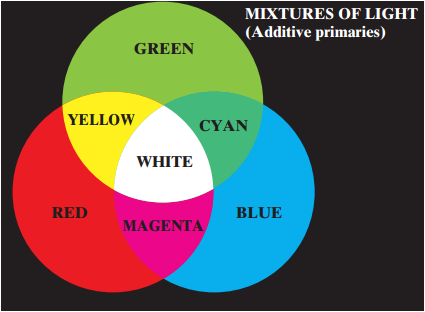
Color image processing is divided into two major areas: full-color and pseudocolor processing. In the first category, the images in question typically are acquired with a full-color sensor, such as a color TV camera or color scanner. In the second category, the problem is one of assigning a color to a particular monochrome intensity or range of intensities.
-
Siswa harusTandai selesai
Although the process followed by the human brain in perceiving and interpreting color is a physiopsychological phenomenon that is not fully understood, the physical nature of color can be expressed on a formal basis supported by experimental and theoretical results.

-
-
-
UJIAN TENGAH SEMESTER (UTS)
Pelaksanaan UTS TeoriHari : JUMATTanggal : 4 Juni 2021UTS TEORI : 5 Juni 2021, 23.59 wibUTS PRAKTIKUM : 31 Mei 2021, 23.59 wib -
-
Wavelet ans Multiresolution Processing
Although the Fourier transform has been the mainstay of transform-based image processing since the late 1950s, a more recent transformation, called the wavelet transform, is now making it even easier to compress, transmit, and analyze many images. Unlike the Fourier transform, whose basis functions are sinusoids, wavelet transforms are based on small waves, called wavelets, of varying frequency and limited duration.This allows them to provide the equivalent of a musical score for an image, revealing not only what notes (or frequencies) to play but also when to play them. Fourier transforms, on the other hand, provide only the notes or frequency information; temporal information is lost in the transformation process.
-
Siswa harusTandai selesai
Image Pyramids
A powerful, yet conceptually simple structure for representing images at more than one resolution is the image pyramid (Burt and Adelson [1983]). Originally devised for machine vision and image compression applications, an image pyramid is a collection of decreasing resolution images arranged in the shape of a pyramid.


-
-
-
Image Compression
Image compression, the art and science of reducing the amount of data required to represent an image, is one of the most useful and commercially successful technologies in the field of digital image processing. The number of images that are compressed and decompressed daily is staggering, and the compressions and decompressions themselves are virtually invisible to the user. Anyone who owns a digital camera, surfs the web, or watches the latest Hollywood movies on Digital Video Disks (DVDs) benefits from the algorithms and standards discussed in this chapter.
-
Siswa harusTandai selesai
The term data compression refers to the process of reducing the amount of data required to represent a given quantity of information. In this definition, data and information are not the same thing; data are the means by which information is conveyed.


-
-
-
Morphological Image Processing
The word morphology commonly denotes a branch of biology that deals with the form and structure of animals and plants.We use the same word here in the context of mathematical morphology as a tool for extracting image components that are useful in the representation and description of region shape, such as boundaries, skeletons, and the convex hull. We are interested also in morphological techniques for pre- or postprocessing, such as morphological filtering, thinning, and pruning.
-
-
Image Segmentation
Segmentation subdivides an image into its constituent regions or objects.The level of detail to which the subdivision is carried depends on the problem being solved.That is, segmentation should stop when the objects or regions of interest in an application have been detected. For example, in the automated inspection of electronic assemblies, interest lies in analyzing images of products with the objective of determining the presence or absence of specific anomalies, such as missing components or broken connection paths. There is no point in carrying segmentation past the level of detail required to identify those elements.
-
-
Representation and Description
An external representation is chosen when the primary focus is on shape characteristics. An internal representation is selected when the primary focus is on regional properties, such as color and texture. Sometimes it may be necessary to use both types of representation. In either case, the features selected as descriptors should be as insensitive as possible to variations in size, translation, and rotation. For the most part, the descriptors discussed in this chapter satisfy one or more of these properties.
-
-
Object Recognition
The approaches to pattern recognition developed in this chapter are divided into two principal areas: decision-theoretic and structural. The first category deals with patterns described using quantitative descriptors, such as length, area, and texture. The second category deals with patterns best described by qualitative descriptors, such as the relational descriptors discussed in Section 11.5.
-
-
TUGAS BESAR
-
Siswa harusTandai selesai

Lakukan cara atau langkah-langkah dan metode yang digunakan untuk merestorasi citra image pada gambar buah apel tersebut?
-
-
-


