
Garis besar topik
-
Assalamu'alaikum Wr. Wb
Tabik pun.......
Assalamualaikum wr. wb
Welcome to my class, my beloved students. It is very nice to meet all of you in this semester. Hoping you all are in good condition and always be happy.
Welcome to my subject of English, especially for the Information System students of Informatiom System Study Program. This subject consists of 2 SKS with 16 meetings include Mid Term and Final Exam. Pay attention with the rules of our teaching learning for this semester. There is the lesson plan and the teaching learning process in RPS. The method of our teaching process is using explanation, discussion and answering and asking question. The whole materials you can see and download from this lms. darmajaya. I really hope that all of you always be active and enjoy studying English with me in this teaching learning process.
May Allah bless us until the end of our study. Enjoy your class and have a nice learning.
Best Regards
Wassalamu'alaikum Wr. Wb
Betty Magdalena
-
Mata kuliah ini memberikan kesempatan kepada mahasiswa untuk meningkatkan kemampuan dalam bahasa inggris secara lisan maupun tulisan. Mahasiswa diajarkan keterampilan dalam grammar dan writing berdasarkan pada kaidah tata bahasa yang benar. Mata kuliah ini mempersiapkan mahasiswa untuk bisa menulis artikel/abstrak skripsi dalam bahasa inggris yang memadai yang dapat dipergunakan dalam penulisan skripsi, melanjutkan pendidikan kejenjang yang lebih tinggi atau bekerja di luar negeri, sehingga mampu bersaing secara global. Untuk tujuan ini, perkuliahan mata kuliah ini meliputi penguasaan kosa kata (vocabulary) dan tata bahasa (grammar). Disamping itu, guna mengembangkan dan meningkatan keterampilan dan kompetensi bahasa inggris mahasiswa, maka perkuliahan ini juga disajikan dalam bentuk membaca (reading), menulis (writing), dan berbicara (speaking).
-
Siswa harusTandai selesai2. Mampu mengidentifikasi bidang keilmuan yang menjadi objek penelitiannya dan memposisikan ke 3 dalam suatu peta penelitian yang dikembangkan melalui pendekatan interdisiplin atau multidsiplin
CP. Pembelajaran Lulusan
Sikap
1. Bertakwa kepada Tuhan Yang Maha Esa dan mampu menunjukkan sikap religious
2. Menginternalisasi nilai, norma, dan etika akademik
3. Menunjukkan sikap bertanggungjawab atas pekerjaan di bidang keahliannya secara mandiri.
CP Pengetahuan
1. Mampu mengembangkan pengetahuan teknologi, dan seni dalam Bahasa Inggris secara mendalam, serta memformulasikan penyelesaian masalah prosedural
2. Mampu menganalisis ilmu pengetahuan teknologi dan seni dalam Bahasa Inggris melalui pendekatan transdisipliner
3. Mampu memecahkan permasalahan ilmu pengetahuan, teknologi, dan/atau seni dalam Bahasa Inggris
Keterampilan Umum:
1. Mampu mengembangkan pemikiran logis, kritis, sistematis, dan kreatif melaluipenelitian ilmiah, penciptaan desain atau karya seni dalam bidang ilmu pengetahuan dan teknologi yang memperhatikan dan menerapkan nilai humaniora sesuai dengan bidang keahliannya, menyusun konsepsi ilmiah dan hasil kajian berdasarkan kaidah, tata cara, dan etika ilmiah dalam bentuk tesis atau bentuk lain yang setara, dan diunggah dalam laman perguruan tinggi, serta makalah yang telah diterbitkan di jurnal ilmiah terakreditasi atau diterima di jurnal internasional
CP Keterampilan Khusus
1. Mampu menghasilkan karya inovatif dalam pengembangan Bahasa Inggris yang teruji secara nasional dan internasional.
2. Mampu mendesain Bahasa Inggris secara professional berdasarkan hasil riset dan pengembangan yang bermanfaat bagi masyarakat dan keilmuan.
CP. Pembelajaran Matakuliah:
1. Mahasiswa mampu menganalisis pembelajaran Bahasa Inggris
2. Mahasiswa mampu mengembangkan pembelajaran Bahasa Inggris.
3. Mahasiswa mampu mendesain pemeblajaran Bahasa Inggris berdasarkan hasil analisis dan pengembangan
2. Metode PembelajaranDilakukan secara ekspositori yaitu : Ceramah, Diskusi, Presentasi, Study Case, Presentasi, Tanya Jawab, Tugas (mandiri dan kelompok)
3. Aspek Penilaian
Sikap : Cara menyampaikan pendapat dalam diskusi, keseriusan, tanggung jawab dan ketepatan waktu mengumpulkan tugas.
Pengetahuan : Penguasaan materi yang di tunjukkan dalam proses tanya jawab, diskusi, presentasi, ujian tengah semester dan ujian akhir semester.
Ketrampilan : Mempunyai kreatifitas dalam menyusun tugas yang berhubungan topik atau materi pembelajaran.
Capaian Pembelajaran Matakuliah (CPMK) : Mahasiswa mampu memahami dan menjelaskan teori dan konsep Manajemen SDM dalam suatu organisasi
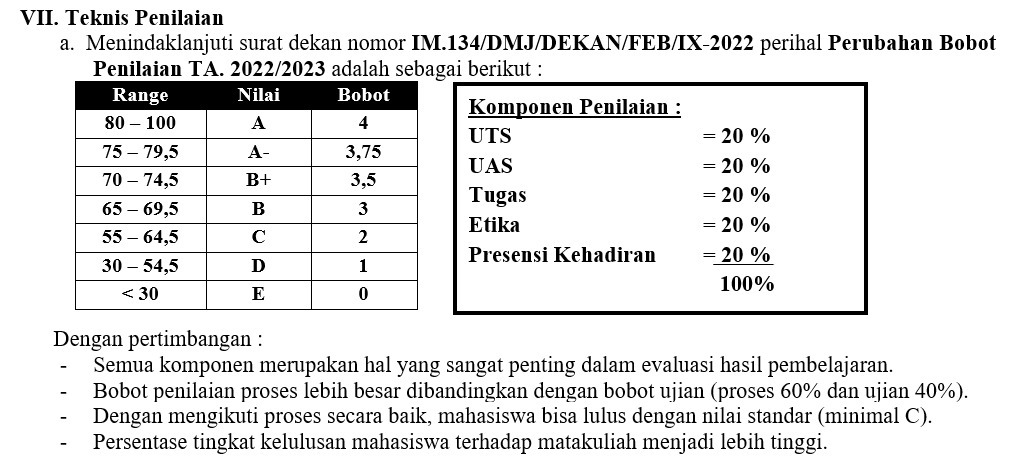
4. Teknik penilaian terdiri dari:
1) observasi
2) partisipasi
3) unjuk kerja
4) test tertulis
5) test lisan
-
-
The first Meeting, Day : Monday, Date :10 March 2025, Time : 13. 00 - 14.30, Topic : Definition of Computer
Definisi komputer
- Komponen perangkat keras dan perangkat lunak
- Fungsi dan jenis sistem operasi-
Siswa harusTandai selesai
Lesson 1 Computer Basics and Operating Systems
I. READING COMPREHENSION
a. Read the passage carefully, and then answer the following questions
Understanding Computer Hardware and Operating System.
Computers are integral to modern life, serving various purposes across different sectors. At their core, computers consist of hardware components such as the central processing unit (CPU), memory (RAM), storage (hard drives or SSDs), and input/output devices (like keyboards and monitors). The CPU acts as the brain of the computer, processing instructions and managing tasks. Memory temporarily stores data that the CPU needs to access quickly, while storage holds data and applications for long-term use.
There are several types of computers, including desktops, laptops, tablets, and servers. Desktops are often used in offices and homes due to their powerful performance and upgradeability.
Laptops offer portability, allowing users to work on the go. Tablets, while limited in functionality compared to desktops and laptops, are convenient for browsing the web and consuming media.
Operating systems (OS) are essential software that manage the computer's hardware and provide
a platform for applications to run. Popular operat ing systems include Microsoft Windows, Apple's macOS, and Linux. Each OS has its features and user interface, catering to different user preferences and needs. Understanding the basics of computer hardware and operating systems is crucial for anyone looking to navigate the digital world effectively.
(Source: Patterson, D. A. (2018). Understanding Computer Architecture. Morgan Kaufmann.)
b. Answer these questions briefly.
1. What are the main hardware components of a computer?
2. What is the primary function of the CPU in a computer?
3. How does memory (RAM) differ from storage in a computer?
4. List three types of computers mentioned in the text.
5. Why are desktops often preferred in offices and homes?
6. What advantage do laptops provide compared to desktops?
7. What are tablets primarily used for, according to the text?
8. What role do operating systems (OS) play in a computer?
9. Name three popular operating systems mentioned in the reading.
10. Why is understanding computer hardware and operating systems important for users?
c. Match the word/ phrase with its definition.
No
Vocabulary
Definition
1
Upgradeability
a) A type of computer that is portable and suitable for mobile use.
2
Multimedia
b) Devices that allow users to input data into a computer and receive output from it (e.g.,
keyboard, monitor).
3
Memory (RAM)
c) The software that manages computer hardware and provides a platform for applications to run.
4
Input/Output Devices
d) The ability to enhance or expand a computer's capabilities by adding components or software.
5
Operating System (OS)
e) A computer designed to be used on a desk, typically more powerful than a laptop.
6
Storage
f) A type of computer that is flat and touchscreen- based, often used for browsing the web and
consuming media.
7
Tablet
g) The component that acts as the brain of the computer, processing instructions.
8
Desktop
h) A type of computer that can perform calculations and store information for immediate access.
9
Central Processing Unit (CPU)
i) The capacity to hold data and applications for long-term use (e.g., hard drives, SSDs).
10
Laptop
-
-
Siswa harusTandai selesai
Answer the questions
1. What is acomputer ?
2. What is the meaning between hardware and software?
3. What are the different types of computers?
Write your answer on your module
-
-
The second meeting, Day : Monday, Date : 17 March, 2025, Time : 13.00 -14.30, Topic : Definition of Computer
Definisi komputer
- Komponen perangkat keras dan perangkat lunak
- Fungsi dan jenis sistem operasi-
Siswa harusTandai selesai
I. SPEAKING
Study the following conversation and then practice it with a friend.
Alice: Hey, Bob! I heard you're looking to buy a new computer. Have you decided what type you want?
Bob: Not really. IΓÇÖm torn between getting a laptop and a desktop. What do you think? Alice: It depends on your needs. If portability is important, go for a laptop. You can take it to classes or work from different places.
Bob: True, I like the idea of working in a café. But I’ve heard desktops are more powerful. Is that right?
Alice: Yes, desktops usually offer better performance and are more upgradeable. You can swap parts like the graphics card or add more RAM.
Bob: ThatΓÇÖs appealing. I might want to play some games too, and I heard desktops handle gaming better.
Alice: Definitely! Desktops are better for gaming. Plus, you can customize them.
Bob: What about tablets? I see a lot of people using them.
Alice: Tablets are great for web browsing and media, but theyΓÇÖre less versatile for tasks like coding or graphic design.
Bob: Good point. IΓÇÖll need to think about what software IΓÇÖll run.
Alice: Exactly! If you need heavy applications, a laptop or desktop with a good OS like Windows or macOS is best.
Bob: I think IΓÇÖm leaning towards a laptop for now but might save for a desktop later. Alice: Sounds like a plan! Just make sure to pick the right operating system for your needs.
Practice: Role Play (Buying a computer)
Mark: Hi, Jessica! I just bought my first computer, but IΓÇÖm confused about operating systems. Can you help?
Jessica: Sure, Mark! Operating systems manage all the hardware and software on your computer. Do you know which one you have?
Mark: I think itΓÇÖs Windows. I see that name a lot.
Jessica: Good choice! Windows is user-friendly and compatible with most applications, widely used in both personal and business settings.
Mark: IΓÇÖve heard about macOS too. WhatΓÇÖs the difference?
Jessica: macOS is for Apple computers, known for its sleek design and strong security, but it has fewer software options compared to Windows.
Mark: What about Linux?
Jessica: Linux is open-source and customizable, popular among developers, but it can be challenging for beginners.
Mark: That sounds interesting but intimidating.
Jessica: It can be! Stick with Windows for now; it supports most software.
Mark: Do I need to worry about updating the OS?
Jessica: Yes, updates are crucial for security and performance. Most systems notify you when updates are available.
Mark: Thanks for the info, Jessica! I feel more confident about my new computer.
Jessica: Anytime, Mark! Feel free to ask if you have more question. -
-
Siswa harusTandai selesai
Practice the conversation with your pathner based on the video above
Perform in front of the class
-
-
The third meeting, Day : Monday, Date 24 March, 2025, Time : 13.00 - 14.30, Topic : Office application
- Aplikasi perkantoran (Word, Excel, PowerPoint)
- Alat kolaborasi online-
Siswa harusTandai selesai
Lesson 2 Software Applications and Productivity Tools
I. READING COMPREHENSION
a. Read the passage carefully, and then answer the following questions
Productivity Tools and Software Applications in the Modern Workplace
Software applications are programs designed to help users perform specific tasks on their computers. These applications range from simple tools to complex systems that drive businesses. Among the most commonly used productivity tools are word processors, spreadsheets, and presentation software.
Word processors like Microsoft Word and Google Docs allow users to create, edit, and format text documents. These tools are essential for writing reports, letters, and essays. Spreadsheets, such as Microsoft Excel and
Google Sheets, provide a platform for organizing, analyzing, and visualizing data. Users can perform calculations, create charts, and manage budgets using these applications. Presentation software, like Microsoft PowerPoint and Google Slides, enables users to create visual presentations to communicate ideas effectively.
In recent years, cloud-based applications have revolutionized the way we work. Platforms like Google Workspace and Microsoft 365 allow for real-time collaboration, enabling multiple users to work on a document simultaneo usly from different locations. This flexibility has transformed team dynamics, making remote work more accessible and efficient. Understanding how to use these productivity tools effectively is vital for both personal and professional success.
(Source: Lewis, J. G. (2020). The Evolution of Office Software: From Word Processors to Cloud- Based Suites. Journal of Software Engineering.)
b. Decide whether the following statements are True, False, or Not Clear (if the information isnΓÇÖt provided in the text).
1. Microsoft Word is a type of word processor.
2. Google Docs is used for creating spreadsheets.
3. Spreadsheets allow users to perform calculations and create charts.
4. Presentation software is used to edit text documents.
5. Cloud-based applications enable real-time collaboration from different locations.
6. Microsoft Excel is only used for managing budgets.
7. Google Workspace is an example of a cloud-based platform.
8. Presentation software is becoming less popular.
9. Cloud-based applications have made remote work easier.
10. Word processors can create visual presentations.
____
____
____
____
____
____
____
____
____
c. Fill in the blanks with the correct word or phrase from the text.
1. Software applications are programs designed to help users perform tasks on their computers.
2. Word processors allow users to create, edit, and format documents.
3. Spreadsheets are used for organizing, analyzing, and visualizing .
4. Presentation software enables users to create to communicate ideas effectively.
5. Cloud-based applications have revolutionized the way we .
6. Microsoft 365 allows for real-time between users from different locations.
7. Using productivity tools effectively is essential for personal and success.
8. Google Workspace and Microsoft 365 are examples of platforms.
9. Users can perform and manage budgets using spreadsheets.
10. Word processors like Microsoft Word are essential for writing reports, letters, and .
-
-
The fourth meeting 4th, Day : Monday, Date : 31 April, 2025, Time : 13.00- 14.30, Topic : Office Application
- Aplikasi perkantoran (Word, Excel, PowerPoint)
- Alat kolaborasi online-
Siswa harusTandai selesai
e. Study the following conversation and then practice it with a friend.
Emily: Hey, Jake! I heard you're using new software at work. How's it going?
Jake: We just switched to Microsoft 365. ItΓÇÖs a big change. Have you used cloud apps before?
Emily: Yeah, we use Google Workspace at my office. Do you like Microsoft 365?
Jake: ItΓÇÖs great! We can all work on the same document at once, and it connects Word, Excel, and PowerPoint. What do you use?
Emily: We use Google Docs and Sheets. Do you think Microsoft 365 is better?
Jake: If you need more advanced tools, Excel is better. ItΓÇÖs great for data. What about you, do you analyze a lot of data?
Emily: Yes, but we just use Google Sheets. Is Excel worth switching to?
Jake: It depends. If you need more features, yes. But Google is easier if you're already using it.
Emily: That makes sense. By the way, do you use Microsoft Teams for meetings?
Jake: Yes, itΓÇÖs built into Microsoft 365. What about you? Still using Zoom or Google Meet?
Emily: We use Google Meet. Is the security good with Microsoft 365?
Jake: Very good. We get regular updates to stay secure. ThatΓÇÖs why our company switched.
Emily: ThatΓÇÖs helpful. IΓÇÖll think about switching!
-
Siswa harusTandai selesai
GRAMMAR POINTS: Simple Present Tense
In the context of software applications and productivity tools, the simple present tense is used to describe actions, facts, or general truths that are habitual or constant. This tense is particularly useful when discussing how these tools function and their impact on users in the modern workplace.
Structure of Simple Present Tense:
 Affirmative Sentences: Subject + base form of the verb (add "s" or "es" for third-person singular).
o Example: "Software applications help users perform specific tasks."
 Negative Sentences: Subject + do/does + not + base form of the verb.
o Example: "Cloud-based applications do not require installation."
 Interrogative Sentences: Do/Does + subject + base form of the verb?
o Example: "Does Microsoft Excel allow users to analyze data?"
-
Siswa harusTandai selesai
Fill in the blanks with the correct form of the verb in parentheses using the simple present tense.
1. Microsoft Word ______ (allow) users to create and edit documents.
2. Google Sheets ______ (provide) tools for data analysis.
3. Users ______ (use) spreadsheets to manage budgets effectively.
4. Presentation software ______ (help) in communicating ideas visually.
5. Many professionals ______ (prefer) cloud-based applications for collaboration.
6. Software applications ______ (assist) in automating repetitive tasks.
7. Word processors ______ (not require) an internet connection to function.
8. Remote teams ______ (benefit) from real-time collaboration tools.
9. Users often ______ (create) charts to visualize data.
10. Microsoft PowerPoint ______ (enable) users to design engaging presentations.
h. Rewrite the following sentences in the simple present tense.
1. Yesterday, I created a document using Google Docs.
2. They are using Microsoft Excel for their data analysis.
3. She will present her ideas using PowerPoint tomorrow.
4. He edited the report last week in Word.
5. The software was helpful for managing project
-
-
The fifth meetings 5th, Day : Monday, Date : 7 April 2025, Time : 13.00-14.30, Topic : Internet and Online Safety
Internet and Online Safety
- Prinsip dasar internet
- Ancaman online dan cara melindungi diri.-
Siswa harusTandai selesai
Internet and Online Safety
I. READING COMPREHENSION
a. Read the passage carefully, and then answer the following questions
Navigating the Internet Safely
Software applications are programs designed to help users perform specific tasks on their computers. These applications range from simple tools to complex systems that drive businesses. Among the most commonly used productivity tools are word processors, spreadsheets, and presentation software.
Word processors like Microsoft Word and Google Docs allow users to create, edit, and format text documents. These tools are essential for writing reports, letters, and essays. Spreadsheets, such as Microsoft Excel and Google Sheets, provide a platform for organizing, analyzing, and visualizing data. Users can perform calculations, create charts, and manage budgets using these applications. Presentation software, like Microsoft PowerPoint and Google Slides, enables users to create visual presentations to communicate ideas effectively.
In recent years, cloud-based applications have revolutionized the way we work. Platforms like Google Workspace and Microsoft 365 allow for real-tim e collaboration, enabling multiple users to work on a document simultaneously from different locations. This flexibility has transformed team dynamics, making remote work more accessible and efficient. Understanding how to use these productivity tools effectively is vital for both personal and professional success.
(Source: Lewis, J. G. (2020). The Evolution of Office Software: From Word Processors to Cloud-Based Suites. Journal of Software Engineering.)
b. Decide whether the following statements are True, False, or Not Clear (if the information isnΓÇÖt provided in the text).
1. The internet only provides opportunities for entertainment.
2. Phishing is a method used by cybercriminals to steal personal information.
3. Strong passwords should include only letters.
4. Two-factor authentication adds an extra layer of security to online accounts.
5. Users should ignore unsolicited emails and messages without any verification.
6. Changing passwords regularly is unnecessary for maintaining online safety.
7. The internet is entirely free from risks.
8. Using a mix of letters, numbers, and symbols is recommended for creating strong passwords.
9. Only large companies need to worry about online safety.
10. Users can fully protect themselves from online threats by using a strong password alone.
-
-
Siswa harusTandai selesai
Fill in the blanks with the appropriate words from the word bank.
Security. Malware. Data breach. Password. Unsolicited. Phishing. Vigilant. Firewall. Authentication.
Encryption
1. __________ is a technique used by cybercriminals to deceive individuals into providing personal information.
2. It is important to create a strong __________ that includes letters, numbers, and symbols.
3. Enabling two-factor __________ adds an extra layer of security to your accounts.
4. Users should remain __________ and check the source of emails before clicking on links.
5. Always be cautious of __________ messages that ask for sensitive information.
6. __________ helps protect your computer from unauthorized access by filtering network traffic.
7. In case of a __________, personal information can be exposed to cybercriminals.
8. Using __________ can safeguard sensitive data by making it unreadable to unauthorized users.
9. To enhance online __________, users should regularly update their software and applications.
10. __________ can slow down your computer and may steal your information if installed.
-
-
The sixth meeting 6th, Day : Monday, Date : 14 April 2025, Time : 13.00 - 14,30, Topic : Internet and Online Safety
Internet and Online Safety
- Prinsip dasar internet
- Ancaman online dan cara melindungi diri.-
Siswa harusTandai selesai
II. SPEAKING
e. Study the following conversation and then practice it with a friend.
Alex: Hey Jamie, IΓÇÖve been thinking about online safety lately. I feel like I need to be more careful.
Jamie: ThatΓÇÖs a smart idea! WhatΓÇÖs on your mind?
Alex: IΓÇÖm worried about phishing scams. I get so many emails that look real but could be trying to steal my information.
Jamie: Definitely a concern! Always check the senderΓÇÖs email and look for red flags like bad grammar. If it seems suspicious, donΓÇÖt click any links.
Alex: Got it. I also struggle with passwords. I sometimes use the same one for everything!
Jamie: ThatΓÇÖs risky! Use different passwords and consider a password manager to keep them secure. Strong passwords are crucial.
Alex: IΓÇÖve heard about two-factor authentication. How does that work?
Jamie: It adds an extra security layer. After entering your password, you get a code on your phone that you also need to enter. Even if someone steals your password, they canΓÇÖt get in without the code.
Alex: That sounds helpful! What about social media?
Jamie: Be careful there, too. Check your privacy settings and avoid sharing personal information.
Alex: Good point! IΓÇÖll make those changes. What else should I do?
Jamie: Ensure your devices have updated antivirus software to protect against malware.
Alex: Thanks, Jamie! I feel more prepared to stay safe online now.
Jamie: No problem! Just stay vigilant and keep learning about online safety.
-
Siswa harusTandai selesai
GRAMMAR POINTS: Modals of Advice and Necessity
Modal Verb
Usage Description
Example
Should
Advice or recommendations
"You should always check the sender's email address."
Ought to
Advice with a moral obligation
"You ought to change your passwords frequently."
Must
Strong obligation or necessity
"You must report any suspicious activity immediately."
Need to
Practical necessity or requirement
"You need to install security updates on your devices."
 Example Sentences:
o "You should use strong passwords."
o "You must enable two-factor authentication."
a. Fill in the blanks with the appropriate modal verb (ought to, must, should, or need to)
1. To enhance your online security, you __________ use strong, unique passwords for each account.
2. If you notice suspicious activity on your account, you __________ report it immediately.
3. People __________ be aware of the dangers of sharing personal information on social media.
4. ItΓÇÖs important that users __________ enable two-factor authentication to protect their accounts.
5. Everyone __________ educate themselves about phishing scams to avoid falling victim.
6. When using public Wi-Fi, you __________ avoid accessing sensitive information.
7. Students __________ take online safety courses to learn how to navigate the internet securely.
8. You __________ change your passwords regularly to ensure better security.
9. If you receive an unsolicited email, you __________ verify the sender before clicking any links.
10. Users __________ not share their passwords with anyone, as it compromises their security.
-
-
-
Meetings 7th, Day : Monday, Date : 21st April 2025, Time : 13.00 -14.30, Topic : Advanced Software Skill
Advanced Sofware Skill
-
Siswa harusTandai selesai
READING COMPREHENSION
a. Read the passage carefully, and then answer the following questions
Data Visualization
Data visualization is the practice of presenting data in graphical formats, making complex information easier to understand. By transforming raw data into visual representations like charts and graphs, users can quickly identify trends, patterns, and outliers, leading to better decision-making.
Tools such as Tableau and Microsoft Power BI have revolutionized data visualization. These platforms allow users to create interactive dashboards and reports that connect to various data sources, enabling real-time data access. They support a range of visual formatsΓÇöbar charts, line graphs, pie charts, and heat mapsΓÇöhelping organizations convey their messages effectively.
Understanding basic design principles is crucial for impactful visualizations. Clear labeling helps viewers understand data quickly, while appropriate color schemes highlight key information and indicate trends. Logical layouts guide viewers through the data, enhancing comprehension. Adhering to these principles ensures visualizations are both aesthetically pleasing and informative.
Additionally, storytelling in data visualization enriches engagement. By framing data within narratives, organizations can make information resonate on a personal level. For example, presenting sales data alongside customer feedback provides deeper insights into market trends.
Ultimately, data visualization transforms complex data into actionable insights, facilitating discussions and informed decisions. As data-driven decision-making becomes increasingly important, mastering data visualization skills will be vital for professionals across various fields.
(Source: Few, S. (2012). Show Me the Numbers: Designing Tables and Graphs to Enlighten. Analytics Press.)
b. Answer the following questions briefly.
1. How does data visualization help in making complex information more understandable?
2. What are some common types of visual representations used in data visualization, and when might you use each?
3. Describe a situation where data visualization could significantly impact decision-making.
4. How do tools like Tableau and Microsoft Power BI enhance the data visualization process?
5. What design principles do you think are most important for creating effective data visualizations?
-
-
-
Siswa harusTandai selesai
The Eight Parts of Speech
There are eight parts of speech in the English language: noun, pronoun, verb, adjective, adverb, preposition, conjunction, and interjection. The part of speech indicates how the word functions in meaning as well as grammatically within the sentence. An individual word can function as more than one part of speech when used in different circumstances. Understanding parts of speech is essential for determining the correct definition of a word when using the dictionary.
1. NOUN
- A noun is the name of a person, place, thing, or idea.
man... Butte College... house... happiness
A noun is a word for a person, place, thing, or idea. Nouns are often used with an article (the, a, an), but not always. Proper nouns always start with a capital letter; common nouns do not. Nouns can be singular or plural, concrete or abstract. Nouns show possession by adding 's. Nouns can function in different roles within a sentence; for example, a noun can be a subject, direct object, indirect object, subject complement, or object of a preposition.
The young girl brought me a very long letter from the teacher, and then she quickly disappeared. Oh my!
See the TIP Sheet on "Nouns" for further information.
2. PRONOUN
- A pronoun is a word used in place of a noun.
She... we... they... it
A pronoun is a word used in place of a noun. A pronoun is usually substituted for a specific noun, which is called its antecedent. In the sentence above, the antecedent for the pronoun she is the girl. Pronouns are further defined by type: personal pronouns refer to specific persons or things; possessive pronouns indicate ownership; reflexive pronouns are used to emphasize another noun or pronoun; relative pronouns introduce a subordinate clause; and demonstrative pronouns identify, point to, or refer to nouns.
The young girl brought me a very long letter from the teacher, and then she quickly disappeared. Oh my!
See the TIP Sheet on "Pronouns" for further information.
3. VERB
- A verb expresses action or being.
jump... is... write... become
The verb in a sentence expresses action or being. There is a main verb and sometimes one or more helping verbs. ("She can sing." Sing is the main verb; can is the helping verb.) A verb must agree with its subject in number (both are singular or both are plural). Verbs also take different forms to express tense.
The young girl brought me a very long letter from the teacher, and then she quickly disappeared. Oh my!
See the TIP Sheet on "Verbs" for more information.
4. ADJECTIVE
- An adjective modifies or describes a noun or pronoun.
pretty... old... blue... smart
An adjective is a word used to modify or describe a noun or a pronoun. It usually answers the question of which one, what kind, or how many. (Articles [a, an, the] are usually classified as adjectives.)
The young girl brought me a very long letter from the teacher, and then she quickly disappeared. Oh my!
See the TIP Sheet on "Adjectives" for more information.
5. ADVERB
- An adverb modifies or describes a verb, an adjective, or another adverb.
gently... extremely... carefully... well
An adverb describes or modifies a verb, an adjective, or another adverb, but never a noun. It usually answers the questions of when, where, how, why, under what conditions, or to what degree. Adverbs often end in -ly.
The young girl brought me a very long letter from the teacher, and then she quickly disappeared. Oh my!
See the TIP Sheet on "Adverbs" for more information.
6. PREPOSITION
- A preposition is a word placed before a noun or pronoun to form a phrase modifying another word in the sentence.
by... with.... about... until
(by the tree, with our friends, about the book, until tomorrow)
A preposition is a word placed before a noun or pronoun to form a phrase modifying another word in the sentence. Therefore a preposition is always part of a prepositional phrase. The prepositional phrase almost always functions as an adjective or as an adverb. The following list includes the most common prepositions:
The young girl brought me a very long letter from the teacher, and then she quickly disappeared. Oh my!
See the TIP Sheet on "Prepositions" for more information.
7. CONJUNCTION
- A conjunction joins words, phrases, or clauses.
and... but... or... while... because
A conjunction joins words, phrases, or clauses, and indicates the relationship between the elements joined. Coordinating conjunctions connect grammatically equal elements: and, but, or, nor, for, so, yet. Subordinating conjunctions connect clauses that are not equal: because, although, while, since, etc. There are other types of conjunctions as well.
The young girl brought me a very long letter from the teacher, and then she quickly disappeared. Oh my!
See the TIP Sheet on "Conjunctions" for more information.
8. INTERJECTION
- An interjection is a word used to express emotion.
Oh!... Wow!... Oops!
An interjection is a word used to express emotion. It is often followed by an exclamation point.
The young girl brought me a very long letter from the teacher, and then she quickly disappeared. Oh my!
-
-
Pertemuan ke 8, Hari : Selasa, Tanggal : 29 April 2025, Waktu : 13.00 - 14.30, Topik : Ujian Tengah Semester
Ujian Tengah Semester
Matakuliah : Bahasa Inggris
Kelas : 6SI2
-
The ninth meeting, Day : Monday, Date : 19 May, 2025, Time : 13.00 - 14.30, Topic : Emerging Technologies
Emerging Technologies
IoT, Big Data, dan Cloud Computing
-
Siswa harusTandai selesai
Top 10: Emerging Technologies
10. Edge computing
Edge computing is whatΓÇÖs revolutionising data processing, by bringing computation closer to the source, reducing latency and enhancing security. By processing data locally, edge computing minimises network congestion, improves response times and bolsters data privacy. Microsoft is investing in this tech with Azure Edge Zones, offering low-latency computing in strategic locations. Additionally, AWS Wavelength integrates with 5G networks to enable real-time applications. Cloudflare's Workers platform also allows developers to build serverless applications at the network edge.
9. Blockchain
Blockchain technology is transforming data management across industries, because this decentralised, distributed ledger system enables secure, transparent transactions without intermediaries. Thanks to Blockchain, Ethereum facilitates smart contracts and decentralised applications. Meanwhile, Ripple focuses on streamlining cross-border payments for financial institutions and IBM Blockchain offers enterprise solutions, particularly in supply chain management, enhancing traceability and efficiency. Beyond cryptocurrencies, blockchain is transforming sectors like healthcare, voting systems and intellectual property rights.
8. Autonomous vehicle
These self-driving cars utilise advanced technologies like radar, LiDAR, cameras and AI to navigate complex environments. Industry leaders Tesla, Waymo and Cruise are at the forefront, each employing unique approaches. Tesla relies heavily on camera-based systems and machine learning, while Waymo and Cruise incorporate multiple sensor modalities and high-definition mapping. However, despite progress, challenges remain in areas of regulation, public acceptance and technical refinement.
7. Biotechnology in agriculture
Biotechnology in agriculture is uplifting food production by enhancing crop yields, resilience and sustainability. Companies like Bayer, Corteva Agriscience and Ginkgo Bioworks are leading innovations such as genetically modified crops resistant to pests, diseases and drought. For example, Golden Rice is biofortified with beta-carotene to combat vitamin A deficiencies. Microbial biotechnology improves soil health through biofertilisers and biopesticides, while precision agriculture optimises farming efficiency.
6. Internet of Things (IoT)
Major players like Amazon's AWS IoT, Google Cloud IoT and Cisco are driving innovation in this space. IoT connects billions of devices to share data and automate processes and now, from smart homes to industrial automation, IoT is transforming how we live and work - enabling real-time decision-making, predictive maintenance and enhanced operational efficiency across sectors. In manufacturing, for example, IoT sensors optimise production cycles - while in agriculture - they monitor crop conditions, whilst smart cities leverage IoT for traffic management and energy conservation.
5. Augmented reality (AR)
AR is changing how we interact with the world, seamlessly blending digital content with our physical environment. Industry leaders like Microsoft's HoloLens, Apple's ARKit and Niantic's Pokémon GO are pushing the boundaries of this technology. AR enhances real-world experiences across various sectors, from gaming to healthcare and manufacturing - this means that smart devices, including phones, tablets, and specialised headsets, serve as gateways to AR experiences.
4. Virtual reality (VR) 2.0
Since VR 2.0 integrates AI for personalised, responsive environments and incorporates haptic feedback for realistic tactile sensations, itΓÇÖs revolutionising immersive experiences across industries. Meta's Oculus, Sony's PlayStation VR and HTC are leading the charge with advanced hardware featuring high-resolution displays and precise motion tracking.
Enhanced accessibility features, including customisable controls and multi-language support, are also making VR more inclusive.
Applications extend beyond gaming to corporate training, healthcare and remote collaboration. The technology now offers hyper-realistic graphics, spatial audio and seamless integration with 5G networks for low-latency experiences.
3. 5G expansion
China is leading the charge with 5G expansion, boasting 4.2 million base stations and aiming for 4.5 million by year-end. According to GSMA Intelligence, 5G connections are expected to reach 5.5 billion by 2030. This growth enables transformative applications in autonomous vehicles, smart cities and industrial automation. Companies like Qualcomm, Ericsson, Nokia and Huawei are driving innovation, focusing on ultra-low latency and massive machine-type communication.
2. Quantum computing
Harnessing the principles of quantum mechanics to solve complex problems beyond the reach of classical computers, quantum computing is hugely impacting the world of computation. Quantum computers utilise qubits, which can exist in multiple states simultaneously, enabling exponential processing power. This breakthrough has far-reaching implications across industries, from drug discovery and financial modeling to cryptography and AI. Quantum computing promises to transform fields like material science, weather forecasting and optimisation. Industry giants IBM, Google, Microsoft and IonQ are at the forefront of this groundbreaking technology.
1. Gen AI
McKinsey reports that 72% of organisations are using Gen AI in one or more business functions as of 2024, compared to 56% in 2021 and MarketsandMarkets estimates the Gen AI market to reach US$136.7bn by 2030. Gen AI is revolutionising industries with its ability to create original content across various mediums and is transforming sectors like healthcare, education and finance, enabling hyper-personalisation, early disease detection and automated content creation.
-
Siswa harusTandai selesai
Emerging Technologies
I. READING COMPREHENSION
a. Read the passage carefully, and then answer the following questions
Emerging Technologies: Shaping the Future
Emerging technologies refer to innovative tools, processes, and concepts that are currently being developed or will be developed in the near future. These technologies have the potential to significantly impact various industries, economies, and societies.
Artificial Intelligence (AI) is one of the most talked-about emerging technologies. It involves the creation of algorithms that allow machines to perform tasks that typically require human intelligence, such as understanding natural language, recognizing patterns, and making decisions. AI is already transforming sectors like healthcare, finance, and transportation. For example, AI algorithms can analyze medical data to assist doctors in diagnosing diseases more accurately.
Blockchain technology is another significant development. Originally created for cryptocurrency, blockchain provides a secure and transparent way to record transactions. Its decentralized nature makes it difficult to alter data, which is why it is increasingly used in various fields, including supply chain management and digital identity verification.
Augmented Reality (AR) and Virtual Reality (VR) are also emerging technologies that are changing how we interact with digital content. AR overlays digital information onto the real world, while VR immerses users in a completely virtual environment. These technologies are being used in gaming, education, and training simulations, offering new ways for users to engage with information.
Internet of Things (IoT) connects everyday devices to the internet, allowing them to collect and share data. Smart home devices, such as thermostats and security systems, are examples of IoT in action. This technology enables greater efficiency and convenience, but it also raises concerns about data privacy and security.
Finally, 5G technology is set to revolutionize communication by providing faster internet speeds and more reliable connections. This will enhanc e the capabilities of other emerging technologies, such as IoT and AI, by allowing them to operate more efficiently.
In conclusion, emerging technologies like AI, blockchain, AR/VR, IoT, and 5G are shaping the future across various sectors. While they bring numerous benefits, it is essential to address the challenges and ethical considerations they present to ensure a positive impact on society.
b. Answer the following questions briefly.
1. How do you think AI will influence the job market in the next few years?
2. What are some advantages of using blockchain technology in everyday transactions?
3. In what ways can AR enhance customer experiences in retail?
How do you envision the future of IoT in smart cities?
5. What ethical considerations should we keep in mind when developing AI technologies?
6. How does 5G technology impact the growth of emerging technologies?
7. Can you give an example of how VR is being used in education?
8. What challenges do companies face when integrating new technologies like IoT?
9. How can emerging technologies improve healthcare services?
10. What skills do you think will be essential for workers in an increasingly tech-driven world?
-
-
Emerging Technologie
IoT, Big Data, dan Cloud Computing
-
Siswa harusTandai selesai
Decide whether the following statements are True, False, or Not Clear (if the information isnΓÇÖt provided in the text).
1. AI can only perform tasks that require human creativity.
2. Blockchain technology is primarily used for social media platforms.
3. AR provides an immersive virtual environment.
4. IoT devices can help improve energy efficiency in homes.
5. 5G technology will have no impact on existing mobile networks.
6. VR is only used for entertainment purposes.
7. Emerging technologies often raise concerns about data security.
8. Blockchain can be easily altered once data is recorded.
9. AI is a form of technology that can learn and adapt.
10. AR requires special glasses to be experienced.
Complete the sentences with the correct form of the verb (present tense or present continuous).
1. Artificial Intelligence (AI) __________ (transform) various industries.
2. Many companies __________ (explore) new blockchain applications right now.
3. The Internet of Things (IoT) __________ (connect) everyday devices to the internet.
4. Augmented Reality (AR) __________ (change) how we engage with information today.
5. 5G technology __________ (provide) faster internet speeds.
g. Select the correct verb form for each sentence.
1. AI (helps / is helping) doctors diagnose diseases more accurately.
2. Blockchain (is growing / grows) in popularity across different sectors.
3. Companies (are investing / invest) heavily in emerging technologies at this moment.
4. VR (offers / is offering) immersive experiences for training purposes.
5. Smart home devices (collect / are collecting) data continuously.
-
-
-
The 11th meetings, Day : Monday, Date : 26th May, 2025, Time : 13.00 - 14.30, Topic : Application of Artificial Intellegence
Artificial Intellegence
Definisi dan jenis AI
Aplikasi AI dalam kehidupan sehari-hari-
Siswa harusTandai selesai
I. GRAMMAR POINTS: Modals of Advice and Necessity
Modal Verb
Usage Description
Example
Should
Advice or recommendations
"You should always check the sender's email address."
Ought to
Advice with a moral obligation
"You ought to change your passwords frequently."
Must
Strong obligation or necessity
"You must report any suspicious activity immediately."
Need to
Practical necessity or requirement
"You need to install security updates on your devices."
- Example Sentences:
- "You should use strong passwords."
- "You must enable two-factor authentication."
a. Fill in the blanks with the appropriate modal verb (ought to, must, should, or need to)
1. To enhance your online security, you __________ use strong, unique passwords for each account.
2. If you notice suspicious activity on your account, you __________ report it immediately.
3. People __________ be aware of the dangers of sharing personal information on social media.
4. ItΓÇÖs important that users __________ enable two-factor authentication to protect their accounts.
5. Everyone __________ educate themselves about phishing scams to avoid falling victim.
6. When using public Wi-Fi, you __________ avoid accessing sensitive information.
7. Students __________ take online safety courses to learn how to navigate the internet securely.
8. You __________ change your passwords regularly to ensure better security.
9. If you receive an unsolicited email, you __________ verify the sender before clicking any links.
10. Users __________ not share their passwords with anyone, as it compromises their security.
-
-
The twelefth meetings, Day : Monday, Date : 2nd June 2025, Time : 13.00 -14.30, Topic : Artificial Intellegence
- Definisi dan jenis AI
Aplikasi AI dalam kehidupan sehari-hari-
Siswa harusTandai selesai
ARTIFICIAL INTELLIGENCE (AI)
I. READING COMPREHENSION
a. Read the passage carefully, and then answer the following questions
The Evolution and Impact of Artificial Intelligence
Artificial Intelligence (AI) is a branch of computer science dedicated to developing machines and systems that can imitate human intelligence. These AI systems are engineered to perform tasks that usually require cognitive functions, such as reasoning, problem-solving, and understanding natural language. The application of AI spans various industries, including healthcare, finance, and technology, where it is employed to automate processes, analyze vast amounts of data, and enhance overall efficiency.
There are two primary categories of AI: Narrow AI and General AI. Narrow AI, also referred to as Weak AI, is task-specific and operates within a limited set of functions. For instance, virtual assistants like Siri and Alexa can manage tasks such as setting reminders or answering inquiries, but they cannot extend their capabilities beyond their programming. Other examples of Narrow AI include facial recognition software, online customer service chatbots, and recommendation systems utilized by platforms like Netflix and Amazon.
On the other hand, General AI, or Strong AI, embodie s the idea of machines capable of performing any intellectual task that a human can manage. This advanced form of AI would be able to understand, learn, and apply knowledge across diverse contexts. While Narrow AI is prevalent in todayΓÇÖs technology landscape, General AI remains a theoretical concept, as no system has yet achieved the level of human-like reasoning that it entails.
b. Answer the following questions briefly.
1. What do you think are the most significant benefits of using AI in healthcare?
2. How can Narrow AI and General AI be distinguished in their applications?
3. In what ways do you believe AI will change the job market in the next decade?
4. Can you provide examples of ethical issues that arise with the use of AI?
5. How do you think AI could enhance the customer experience in retail?
6. What challenges do you foresee in implementing AI in education?
7. How does data bias impact the effectiveness of AI systems?
8. In your opinion, what measures should be taken to ensure the ethical use of AI?
9. How might AI influence decision-making in finance?
10. What role do you see for AI in addressing global challenges, such as climate change?
-
-
Siswa harusTandai selesai
The Passive Voice
Sentences can be active or passive. We usually use the active in written and spoken language. The difference is that in an active sentence the subject performs the action and in a passive sentence the subject receives the action. Study the following information to learn how to form a passive sentence, how to put an active into a passive sentence and how to form the tenses in the passive voice.
How to form the Passive
Form of to be + past participle (3rd form) of the verb
Tense Passive form Present tense am / is / are invited Past tense was / were invited Future tense will be invited
.1. Active : Artificial Intelligence (AI) dedicates the developing machines and systems.2. Active : Al aplication managed some tasks such Alexa.
3. AI applications will improve efficiency in manufacturing.
Change into passive voice for the active sentence above
-
-
The 13th meetings, Day : Monday, Date : 9 June, 2025, Time : 13.00 - 14.30, Topic : CYBERSECURITY AND DATA PROTECTION
Cybersecurity
- Konsep dasar cybersecurity
- Perlindungan data-
Siswa harusTandai selesai
CYBERSECURITY AND DATA PROTECTION
I. READING COMPREHENSION
a. Read the passage carefully, and then answer the following questions
The Importance of Cybersecurity and Data Protection in the Digital Age
In today's digital age, cybersecurity and data protection are critical for individuals and organizations alike. Cybersecurity involves the practices, technologies, and processes designed to protect networks, devices, and data from cyber threats. These threats can include malware, phishing, and ransomware attacks, which can result in significant financial losses and damage to reputations.
Data protection, on the other hand, focuses on safeguarding personal information and ensuring that it is collected, stored, and processed securely. With the increasing reliance on digital communication, the risk of data breaches has also escalated. Organizations are required to comply with various regulations, such as the General Data Protection Regulation (GDPR) in the European Union, which aims to protect individuals' privacy rights.
Effective cybersecurity measures include using strong pass words, enabling two-factor authentication, and regularly updating software. Training employees on recognizing and responding to cyber threats is also vital. By fostering a culture of cybersecurity awareness, organizations can significantly reduce their vulnerability to cyber attacks.
As individuals, we can also take steps to protect our data. This includes being cautious about the information we share online, using secure connections, and regularly monitoring our accounts for suspicious activity. In an era where data is often referred to as the new oil, understanding the importance of cybersecurity and data protection is essential for safeguarding our personal and professional lives.
b. Answer the following questions briefly.
1. What do you think are the most significant benefits of using AI in healthcare?
2. How can Narrow AI and General AI be distinguished in their applications?
3. In what ways do you believe AI will change the job market in the next decade?
4. Can you provide examples of ethical issues that arise with the use of AI?
5. How do you think AI could enhance the customer experience in retail?
6. What challenges do you foresee in implementing AI in education?
7. How does data bias impact the effectiveness of AI systems?
8. In your opinion, what measures should be taken to ensure the ethical use of AI?
9. How might AI influence decision-making in finance?
10. What role do you see for AI in addressing global challenges, such as climate change?
c. Decide whether the following statements are True, False, or Not Clear (if the information isnΓÇÖt provided in the text).
1. AI can perform any task a human can do.
2. Narrow AI is commonly used in everyday applications.
3. General AI is already implemented in various industries.
4. AI applications can improve efficiency in manufacturing.
5. All AI systems are equally intelligent.
6. AI has no ethical implications in its use.
7. Data privacy concerns are irrelevant when discussing AI.
8. Virtual assistants are examples of Narrow AI.
9. General AI is more advanced than Narrow AI.
10. AI can help diagnose diseases in healthcare settings.
-
-
Cybersecurity
konsep dasar cybersecurity
perlindungan data.
-
Siswa harusTandai selesai
II. SPEAKING
f. Study the following conversation and then practice it with a friend.
Alex: Hey, Jordan! IΓÇÖve been thinking about the moral principles we need for AI development. It feels more important than ever.
Jordan: Definitely! Ethics should be a top priority. What principles do you think matter most?
Alex: I think transparency is key. Users should understand how AI makes decisions; otherwise, itΓÇÖs hard to trust.
Jordan: Exactly! Transparency can help address bias in algorithms. When we donΓÇÖt know how a system works, biases can slip through.
Alex: Right! Fairness is crucial too. We need to ensure AI doesnΓÇÖt discriminate, which means using diverse datasets.
Jordan: And accountability is essential. If an AI system causes harm, we need to know who is responsibleΓÇödevelopers, companies, or users.
Alex: For sure! Privacy is also a big issue. With AI collecting personal data, we must protect people's privacy rights.
Jordan: Absolutely. Users should control their data and know how itΓÇÖs being used.
Alex: Lastly, I think we should focus on promoting good. AI should enhance lives, not just be efficient.
Jordan: Yes! Developers, policymakers, and ethicists need to work together on these guidelines. We have a lot of responsibility.
Alex: IΓÇÖm glad weΓÇÖre discussing this. ItΓÇÖs a big challenge, but itΓÇÖs important!
Jordan: Agreed! LetΓÇÖs keep talking about it as we move forward.
helpful. IΓÇÖll think about switching!
Asking About Artificial Intelligence
Telling About Artificial Intelligence
o "What are your thoughts on the ethical implications of AI?"
o "How do you feel about transparency
 "One important principle is transparency; which builds trust in AI systems."
Conversation 1
in AI systems?"
o "Can you explain the importance of accountability in AI development?"
o "What do you think is the most important principle guiding AI ethics?"
o "How do you view the issue of bias in AI algorithms?"
o "Could you share your perspective on privacy concerns in AI?"
o "What challenges do you see regarding fairness in AI?"
 "It’s crucial to ensure that AI systems are fair and do not discriminate."
 "We need to focus on accountability when discussing AI ethics."
 "A major concern is data privacy, especially with personal information being used."
 "It’s vital to consider how AI can promote human well-being."
 "Many experts believe that collaboration among stakeholders is essential for ethical AI."
 "In summary, we should prioritize moral principles like fairness and accountability in AI development.
g. Practice: Cybersecurity Crisis Management (Role-Play)
Activity Outline:
 Preparation: Work into pairs or small groups, one student (or group) to act as an IT professional or cybersecurity expert, and the other as an employee or client whose data has been compromised in a cyber attack.
 Scenario: The employee/client has just discovered a data breach and contacts the IT expert to resolve the issue. The IT expert must explain the steps to mitigate the breach, educate the employee about future precautions (e.g., strong passwords, two-factor authentication), and discuss the company's data protection policies.
 Speaking Focus: The students will need to:
a. Use vocabulary related to cybersecurity (e.g., "malware," "phishing," "data breach").
b. Practice giving advice and instructions.
c. Role-play a professional conversation, using polite and formal language.
d. Ask and answer questions about protecting personal data and company policies.
 Debrief: After the role-play, students can reflect on their performance, discussing what cybersecurity measures they learned and how they can apply them in real life.
-
-
The 15 meetings, Day : Monday, Date : 23 June 2025, Time ; 13.00 - 14.30, Topic : CYBERSECURITY AND DATA PROTECTION :
CYBERSECURITY AND DATA PROTECTION
-
Siswa harusTandai selesai
III. GRAMMAR: Present Perfect Tense
The present perfect tense is used to describe actions that occurred at an unspecified time before now. The exact time is not important. It is often used in the context of cybersecurity and data protection to discuss experiences, changes, or achievements related to security measures.
Examples:
1. Organizations have implemented new cybersecurity measures to protect against data breaches.
2. Many individuals have become more aware of the importance of data protection in recent years.
3. Cyber threats have increased significantly with the rise of online activities.
35
h. Complete the sentences with the correct form of the present perfect tense.
1. Many companies __________ (implement) stronger firewalls to protect their systems.
2. Over the past few years, hackers __________ (become) more sophisticated in their attacks.
3. My organization __________ (not experience) a major data breach so far.
4. Governments __________ (introduce) new laws to enhance data protection.
5. Recently, more people __________ (realize) the importance of using strong passwords.
6. Cybersecurity experts __________ (discover) several vulnerabilities in popular software this year.
7. The IT department __________ (not update) the antivirus software yet.
8. Many users __________ (report) suspicious emails to their security teams recently.
9. Companies __________ (adopt) encryption methods to secure sensitive information over the past few months.
10. Our team __________ (successfully prevent) several phishing attempts since the new measures were implemented.
IV. WRITING: Personal Cybersecurity Tips
i. Write a short paragraph about personal cybersecurity tips based on your understanding of the topic. Study the example below:
:
In todayΓÇÖs digital age, protecting your personal information is crucial for maintaining cybersecurity. First and foremost, always use strong, unique passwords for each of your accounts and consider employing a password manager to keep track of them. Enable two-factor authentication whenever possible to add an extra layer of security. Be cautious when clicking on links or downloading attachments from unknown sources, as these could lead to phishing scams or malware. Regularly update your software and devices to ensure you have the latest security patches. Lastly, educate yourself about common cyber threats and stay vigilant about monitoring your accounts for any suspicious activity. By following these tips, you can significantly reduce your risk of falling victim to cyber attacks.
-